# Build a Clean Joomla Header Search Popup in Minutes - For Free
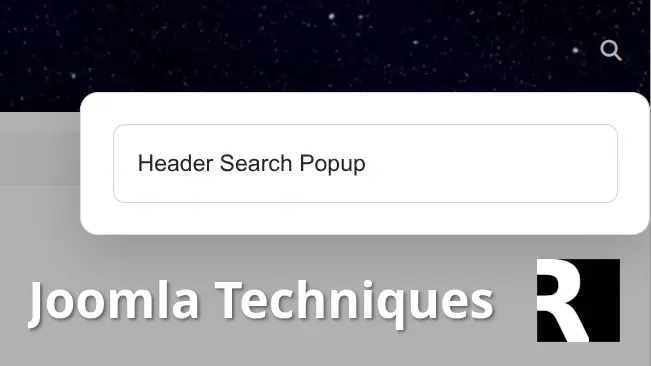 Many [Joomla users](/blog/personal/why-my-joomla-extensions-are-free "Why My Joomla Extensions Are Free") want a clean **Joomla header search popup** instead of a bulky permanent search box that eats up valuable header real estate. A modern **Joomla search popup** triggered by a simple icon keeps the design sleek while giving visitors quick access to search when they need it. Best of all, it uses the web-standard [Popover API](https://developer.mozilla.org/en-US/docs/Web/API/Popover_API "Popover API"). How well does it work? It's in the header above!
If you've been searching for a **header search popup** solution, this tutorial delivers exactly that using only Joomla's built-in Smart Search module, a small amount of [CSS](/blog/development/fun-with-svgs "Fun With SVG Graphics"), and a lightweight JavaScript snippet. No additional extensions are required beyond the free **System - HeadTag** plugin for easy code injection. If you're comfortable adding a CSS and JS file to your template - you won't need any extensions at all.
This approach is especially useful for anyone tired of complicated template overrides or paid modules just to achieve a basic **Joomla search icon in header** that opens a nice popup.
## Why a Dedicated Joomla Header Search Popup Matters
A permanent search field in the header can make your site feel cluttered, especially on mobile or minimalist designs. A **Joomla header search popup** solves this by hiding the search form until the user clicks an icon. The popup then appears cleanly with a backdrop, proper positioning, and auto-focus on the input field.
The best part? You can achieve this with core Joomla functionality. The Smart Search module (mod\_finder) already provides powerful search features like suggestions and advanced filtering. We simply transform it into a **header search popup** with minimal configuration changes.
## The Common Pain Point: Adding Custom Code in Joomla
One frequent complaint when building a **Joomla search popup** is where to place the extra JavaScript and CSS. Traditional advice often points to editing files like media/templates/site/yourtemplate/js/user.js or user.css.
For many site owners this isn't beginner-friendly:
- Some templates don't automatically load those files consistently.
- Updates to the template can overwrite your [custom code](/joomla-techniques/insert-anything-into-your-joomla-articles "Insert Anything Into Your Joomla Articles").
- It feels intimidating if you're not comfortable working directly inside template folders.
That's where the free [System - Head Tag](/software/joomla/plugins/system-headtag) plugin shines. It lets you inject custom JavaScript and CSS directly into the page <head> from the Joomla admin area. You can even target specific [menu items](/blog/hosting/unavailable-after-white-hat-seo-hack-might-be-paying-off "unavailable_after White-Hat SEO Hack Might Be Paying Off") or [user groups](/blog/personal/pre-configured-client-extension-inspired-by-sap "Pre-Configured Client Extension Inspired by SAP") if needed. Using **System - HeadTag** makes creating a **Joomla header search popup** much more accessible without risky template edits.
## Step 1: Configure the Smart Search Module
This is the core of the solution and requires only a few settings.
1. Go to **Extensions → Modules** in your Joomla administrator.
2. Edit your existing Smart Search module or create a new one.
3. Assign the module to a header position (the module output will be hidden from normal display flow once the popover is active).
4. Switch to the **Advanced** tab and set these exact values:
- **Module Class**: xpopover d-none
- **Module Style**: html5
- **[Show Title](/joomla-techniques/joomla-article-index-in-a-module-position "Joomla Article Index in a Module Position")**: hide (hide the title)
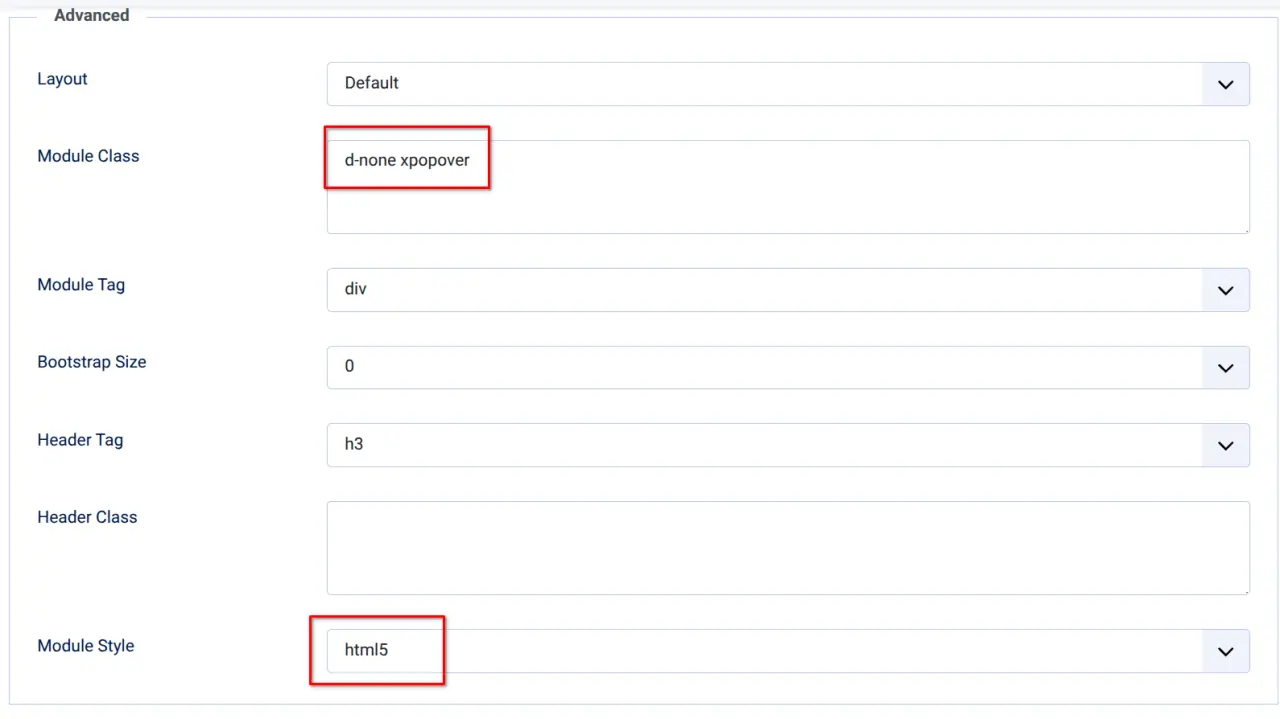
Save the module. Joomla will now render the full Smart Search form (with any suggestions or options you've enabled) inside a container that has the class xpopover d-none (hidden).
That's all the module configuration needed. No custom form HTML required.
## Step 2: Add the CSS for Your Joomla Header Search Popup
Add the following CSS using the **System - HeadTag** plugin (in the CSS section), or if you're not using the plugin, add it to your template user.css stylesheet.
CSS
```
/* Trigger Icon */
.search-trigger-icon {
background: none;
border: none;
padding: 8px 12px;
cursor: pointer;
color: #fff;
transition: transform 0.25s ease, color 0.2s;
}
.search-trigger-icon:hover {
transform: scale(1.12);
color: #ddd;
}
/* The popover */
#popoversearchbox {
background: white;
border: 1px solid #ddd;
border-radius: 12px;
box-shadow: 0 12px 40px rgba(0,0,0,0.18);
padding: 1.5rem;
width: 380px;
max-width: 90vw;
margin-top: 8px; /* small spacing from icon */
position-area: bottom right; /* position relative to trigger */
overflow: visible;
}
#popoversearchbox::backdrop {
background-color: rgba(0, 0, 0, 0.3);
}
/* Style inside the popover */
#popoversearchbox input.js-finder-search-query {
width: 100%;
padding: 14px 16px;
font-size: 1.1rem;
border-radius: 8px;
}
```
This CSS styles both the trigger icon and the **Joomla search popup** itself, giving it a modern look with rounded corners, shadow, and a semi-transparent backdrop.
## Step 3: Add the JavaScript (The Trigger Icon Is Created Automatically)
Add this JavaScript snippet. Again, **System - HeadTag** is the cleanest method (in the JavaScript section). Otherwise, place it in your template's [user.js](/joomla-techniques/load-feedback-in-joomla-without-an-extension "Load Feedback in Joomla Without an Extension") file that loads site-wide.
JavaScript
```
var initSearchPopover = function() {
const popoverBox = document.querySelector('div.xpopover');
if (!popoverBox) return;
// Setup the popover
popoverBox.setAttribute('popover', 'auto'); // 'auto' = nice light dismiss
popoverBox.setAttribute('id', 'popoversearchbox');
popoverBox.setAttribute('anchor', 'popoversearchboxbtn');
// Remove hiding class if you're using one
popoverBox.classList.remove('d-none', 'hidden');
// === Create or find the trigger icon ===
let trigger = document.querySelector('.search-trigger-icon');
if (!trigger) {
trigger = document.createElement('button');
trigger.type = 'button';
trigger.className = 'search-trigger-icon';
trigger.setAttribute('id', 'popoversearchboxbtn');
trigger.setAttribute('popovertarget', 'popoversearchbox');
trigger.setAttribute('aria-label', 'Open search');
// Using Font Awesome (as in your CSS)
trigger.innerHTML = '';
// Insert the trigger right before the popover
if (popoverBox.parentNode) {
popoverBox.parentNode.insertBefore(trigger, popoverBox);
}
}
// Optional: Auto-focus the search input when popover opens
popoverBox.addEventListener('toggle', function(e) {
if (e.newState === 'open') {
const input = popoverBox.querySelector('input[name="q"], input.js-finder-search-query');
if (input) {
setTimeout(() => {
input.focus();
input.select();
}, 100);
}
}
});
};
window.addEventListener('DOMContentLoaded', initSearchPopover);
```
The JavaScript does the heavy lifting: it turns the Smart Search module into a proper **header search popup**, creates the search trigger icon automatically, and adds auto-focus for a smooth user experience.
After adding the code, clear your [Joomla cache](/joomla-techniques/youtube-rss-feed-gallery "YouTube RSS Feed Gallery") (and your browser cache if testing). You should now have a fully functional **Joomla header search popup** triggered by a clean icon in the header.
This method keeps everything lightweight, uses native browser features, and fully leverages Joomla's Smart Search capabilities. It's an excellent free alternative for anyone building a modern **Joomla search icon in header** experience.
## Frequently Asked Questions:
What is a Joomla header search popup and why should I use one?A Joomla header search popup is a modern search interface where the search box remains hidden behind a simple icon in the header. When a visitor clicks the icon, a clean popup opens containing the full search form. This approach keeps your header design minimal and uncluttered while still providing quick and convenient access to search functionality.
Does this Joomla search popup tutorial require any paid extensions?No. This entire solution uses only Joomla’s built-in Smart Search module, the native HTML Popover API, and a small amount of CSS and JavaScript. No paid extensions or modules are required at all.
Do I need to edit template files like user.js or user.css to implement this?Not necessarily. While it is possible to add the CSS and JavaScript directly into your template files, it is much cleaner and safer to use the free System - HeadTag plugin. This plugin allows you to inject custom code from the Joomla administrator without touching template folders, making the setup far more beginner-friendly and maintainable.
What exactly do I need to change in the Smart Search module?In the module’s Advanced tab, you only need to make three simple changes: set the Module Class to: xpopover d-none, set the Module Style to html5, and hide the title by setting Show Title to No. That is all the configuration required on the module side.
Will this Joomla header search popup work with Joomla 5 and Joomla 6?Yes. The solution is built using core Joomla functionality and the native Popover API, which has excellent support in modern browsers. It works reliably on both Joomla 5 and Joomla 6.
Does the JavaScript automatically add the search trigger icon?Yes. The provided JavaScript automatically detects the Smart Search module, converts it into a popover, and dynamically creates the search trigger icon right before the module. You do not need to add any extra HTML for the button yourself.
Can I make the popup appear fullscreen on mobile devices?Yes. You can easily extend the JavaScript to detect smaller screen sizes and apply fullscreen styling such as 100vw width and 100vh height with zero border radius. This is a popular enhancement for better mobile user experience.
Is the Popover API supported in all browsers?The HTML Popover API has very good support across modern browsers in 2026. In older browsers that do not support it, the module will simply display as normal content, providing a graceful fallback.
Can I use Joomla’s core search module instead of Smart Search?Yes, the method works with either. However, Smart Search is recommended because it offers better performance, search suggestions, and filtering options. Minor adjustments to the JavaScript selectors may be needed if you use the basic search module.
How do I customize the appearance of the popup?All visual styling is controlled through the provided CSS. You can freely modify colors, width, padding, shadows, border radius, and positioning by editing the rules for #popoversearchbox and .search-trigger-icon. The JavaScript also respects the position-area attribute for flexible placement.
Will this solution affect my site’s performance?No. The implementation is extremely lightweight, consisting of only a few lines of vanilla JavaScript and CSS with no additional frameworks or heavy extensions. It uses native browser features, resulting in minimal performance impact.
Where is the best place to add the CSS and JavaScript code?The cleanest and most recommended method is using the template user.js and user.css files. If you aren't comfortable with that, you can use the free System - HeadTag plugin, as it keeps your custom code separate from the template files and makes future updates much safer and easier to manage.
- [ email ](mailto:?subject=Build+a+Clean+Joomla+Header+Search+Popup+in+Minutes+-+For+Free&body=https%3A%2F%2Fwww.richeyweb.com%2Fjoomla-techniques%2Fbuild-a-clean-joomla-header-search-popup-in-minutes-for-free)
- [ facebook ](https://www.facebook.com/sharer/sharer.php?u=https%3A%2F%2Fwww.richeyweb.com%2Fjoomla-techniques%2Fbuild-a-clean-joomla-header-search-popup-in-minutes-for-free)
- [ x-twitter ](https://twitter.com/intent/tweet?text=Build+a+Clean+Joomla+Header+Search+Popup+in+Minutes+-+For+Free%3A+https%3A%2F%2Fwww.richeyweb.com%2Fjoomla-techniques%2Fbuild-a-clean-joomla-header-search-popup-in-minutes-for-free)
- [ linkedin ](http://www.linkedin.com/shareArticle?mini=true&url=https%3A%2F%2Fwww.richeyweb.com%2Fjoomla-techniques%2Fbuild-a-clean-joomla-header-search-popup-in-minutes-for-free&title=Build+a+Clean+Joomla+Header+Search+Popup+in+Minutes+-+For+Free&summary=Many+Joomla+users+want+a+clean+Joomla+header+searc...)
- [ pinterest ](http://pinterest.com/pin/create/button/?url=https%3A%2F%2Fwww.richeyweb.com%2Fjoomla-techniques%2Fbuild-a-clean-joomla-header-search-popup-in-minutes-for-free&media=https%3A%2F%2Fwww.richeyweb.com%2Fimages%2Farticles%2Fbuild-a-clean-joomla-header-search-popup-in-minutes-for-free%2Fsearch-module-config.webp&description=Build+a+Clean+Joomla+Header+Search+Popup+in+Minutes+-+For+Free)
[ Previous article: Load Feedback in Joomla Without an Extension Load Feedback in Joomla Without an Extension ](/joomla-techniques/load-feedback-in-joomla-without-an-extension) [ Next article: Show Your Site’s Last Updated Date with a Simple Module Override Show Your Site’s Last Updated Date with a Simple Module Override ](/joomla-techniques/show-your-sites-last-updated-date-with-a-simple-module-override)
##### We Value Your Privacy
We use cookies to enhance your experience and for traffic analysis. By continuing to visit this site you agree to our use of cookies.
[Privacy Policy](/privacy-policy)
Details
###### Google Tag Manager Items
- Ad Storage
- Ad User Data
- Ad Personalization
- Analytics Storage
- Functionality Storage
- Personalization Storage
- Security Storage
Decline Accept
```json
{"@context":"https://schema.org","@graph":[{"@type":"Organization","@id":"https://www.richeyweb.com/#organization","name":"RicheyWeb","url":"https://www.richeyweb.com/","logo":{"@type":"ImageObject","url":"https://www.richeyweb.com/images/logo/richeyweb.svg","contentUrl":"https://www.richeyweb.com/images/logo/richeyweb.svg","width":{"@type":"QuantitativeValue","value":38,"unitCode":"PX"},"height":{"@type":"QuantitativeValue","value":38,"unitCode":"PX"},"@id":"https://www.richeyweb.com/#logo"},"image":{"@id":"https://www.richeyweb.com/#logo"},"sameAs":["https://x.com/ComRicheyweb","https://www.facebook.com/RicheyWebDev/","https://www.youtube.com/channel/UCxnVG8BwOvQRO7hVqNX7T2g","https://community.joomla.org/service-providers-directory/listings/115:richeyweb.html"],"description":"RicheyWeb is a custom software developer specializing in Joomla extensions.","ContactPoint":[{"@type":"ContactPoint","url":"https://www.richeyweb.com/contact-us","telephone":"903-873-8460","contactType":"Owner/Administrator","areaServed":["United States",{"@type":"Country","name":"United States","sameAs":["https://en.wikipedia.org/wiki/United_States","https://www.wikidata.org/wiki/Q30","https://g.co/kg/m/09c7w0"]},"European Union",{"@type":"AdministrativeArea","name":"European Union","sameAs":["https://en.wikipedia.org/wiki/European_Union","https://www.wikidata.org/wiki/Q458","https://g.co/kg/m/0_6t_z8"]},"United Kingdom",{"@type":"Country","name":"United Kingdom","sameAs":["https://en.wikipedia.org/wiki/United_Kingdom","https://www.wikidata.org/wiki/Q145","https://g.co/kg/m/07ssc"]},"Australia",{"@type":"Country","name":"Australia","sameAs":["https://en.wikipedia.org/wiki/Australia","https://www.wikidata.org/wiki/Q408","https://g.co/kg/m/0chghy"]},"Canada",{"@type":"Country","name":"Canada","sameAs":["https://en.wikipedia.org/wiki/Canada","https://www.wikidata.org/wiki/Q16","https://g.co/kg/m/0d060g"]},"Russia",{"@type":"Country","name":"Russia","sameAs":["https://en.wikipedia.org/wiki/Russia","https://www.wikidata.org/wiki/Q159","https://g.co/kg/m/06bnz"]},"China",{"@type":"Country","name":"China","sameAs":["https://en.wikipedia.org/wiki/China","https://www.wikidata.org/wiki/Q148","https://g.co/kg/m/0d05w3"]}],"availableLanguage":"en"},{"@type":"ContactPoint","url":"https://www.richeyweb.com/bugs","telephone":"903-873-8460","contactType":"Technical Support","areaServed":["United States",{"@type":"Country","name":"United States","sameAs":["https://en.wikipedia.org/wiki/United_States","https://www.wikidata.org/wiki/Q30","https://g.co/kg/m/09c7w0"]},"European Union",{"@type":"AdministrativeArea","name":"European Union","sameAs":["https://en.wikipedia.org/wiki/European_Union","https://www.wikidata.org/wiki/Q458","https://g.co/kg/m/0_6t_z8"]},"United Kingdom",{"@type":"Country","name":"United Kingdom","sameAs":["https://en.wikipedia.org/wiki/United_Kingdom","https://www.wikidata.org/wiki/Q145","https://g.co/kg/m/07ssc"]},"Australia",{"@type":"Country","name":"Australia","sameAs":["https://en.wikipedia.org/wiki/Australia","https://www.wikidata.org/wiki/Q408","https://g.co/kg/m/0chghy"]},"Canada",{"@type":"Country","name":"Canada","sameAs":["https://en.wikipedia.org/wiki/Canada","https://www.wikidata.org/wiki/Q16","https://g.co/kg/m/0d060g"]},"Russia",{"@type":"Country","name":"Russia","sameAs":["https://en.wikipedia.org/wiki/Russia","https://www.wikidata.org/wiki/Q159","https://g.co/kg/m/06bnz"]},"China",{"@type":"Country","name":"China","sameAs":["https://en.wikipedia.org/wiki/China","https://www.wikidata.org/wiki/Q148","https://g.co/kg/m/0d05w3"]}],"availableLanguage":"en"}],"knowsAbout":["Computer programming",{"@type":"Thing","name":"Computer programming","sameAs":["https://en.wikipedia.org/wiki/Computer_programming","https://www.wikidata.org/wiki/Q80006","https://g.co/kg/m/01mf_"]},"PHP",{"@type":"Thing","name":"PHP","sameAs":["https://en.wikipedia.org/wiki/PHP","https://www.wikidata.org/wiki/Q59","https://g.co/kg/m/060kv"]},"JavaScript",{"@type":"Thing","name":"JavaScript","sameAs":["https://en.wikipedia.org/wiki/JavaScript","https://www.wikidata.org/wiki/Q2005","https://g.co/kg/m/02p97"]},"arduino","Computer forensics",{"@type":"Thing","name":"Computer forensics","sameAs":["https://en.wikipedia.org/wiki/Computer_forensics","https://www.wikidata.org/wiki/Q878553","https://g.co/kg/m/02wxbd"]},"White hat",{"@type":"Thing","name":"White hat","sameAs":["https://en.wikipedia.org/wiki/White_hat_(computer_security)","https://www.wikidata.org/wiki/Q7995625","https://g.co/kg/m/03ns_5"]},"Search engine optimization",{"@type":"Thing","name":"Search engine optimization","sameAs":["https://en.wikipedia.org/wiki/Search_engine_optimization","https://www.wikidata.org/wiki/Q180711","https://g.co/kg/m/019qb_"]},"Search engine marketing",{"@type":"Thing","name":"Search engine marketing","sameAs":["https://en.wikipedia.org/wiki/Search_engine_marketing","https://www.wikidata.org/wiki/Q846132","https://g.co/kg/m/06mw8r"]},"Digital marketing",{"@type":"Thing","name":"Digital marketing","sameAs":["https://en.wikipedia.org/wiki/Digital_marketing","https://www.wikidata.org/wiki/Q1323528","https://g.co/kg/g/122hcnps"]},"Web hosting service",{"@type":"Thing","name":"Web hosting service","sameAs":["https://en.wikipedia.org/wiki/Web_hosting_service","https://www.wikidata.org/wiki/Q5892272","https://g.co/kg/m/014pz4"]},"Email hosting service",{"@type":"Thing","name":"Email hosting service","sameAs":["https://en.wikipedia.org/wiki/Email_hosting_service","https://www.wikidata.org/wiki/Q5368818","https://g.co/kg/m/09w60m"]},"Internet hosting service",{"@type":"Thing","name":"Internet hosting service","sameAs":["https://en.wikipedia.org/wiki/Internet_hosting_service","https://www.wikidata.org/wiki/Q1210425","https://g.co/kg/m/09w5yw"]},"Virtual hosting",{"@type":"Thing","name":"Virtual hosting","sameAs":["https://en.wikipedia.org/wiki/Virtual_hosting","https://www.wikidata.org/wiki/Q588365","https://g.co/kg/m/024mvh"]},"Web performance",{"@type":"Thing","name":"Web performance","sameAs":["https://en.wikipedia.org/wiki/Web_performance","https://www.wikidata.org/wiki/Q7978612","https://g.co/kg/m/0gfj3f1"]},"Web content management system",{"@type":"Thing","name":"Web content management system","sameAs":["https://en.wikipedia.org/wiki/Web_content_management_system","https://www.wikidata.org/wiki/Q45211","https://g.co/kg/m/0615s2"]},"Content management system",{"@type":"Thing","name":"Content management system","sameAs":["https://en.wikipedia.org/wiki/Content_management_system","https://www.wikidata.org/wiki/Q131093","https://g.co/kg/m/0k23c"]},"General Data Protection Regulation",{"@type":"Thing","name":"General Data Protection Regulation","sameAs":["https://en.wikipedia.org/wiki/General_Data_Protection_Regulation","https://www.wikidata.org/wiki/Q1172506","https://g.co/kg/m/0pk_7xs"]},"SERP",{"@type":"Thing","name":"SERP","sameAs":["https://en.wikipedia.org/wiki/SERP","https://www.wikidata.org/wiki/Q2205811","https://g.co/kg/g/11c5szp7kc"]},"Artificial intelligence",{"@type":"Thing","name":"Artificial intelligence","sameAs":["https://en.wikipedia.org/wiki/Artificial_intelligence","https://www.wikidata.org/wiki/Q11660","https://g.co/kg/m/0mkz"]},"Prompt engineering",{"@type":"Thing","name":"Prompt engineering","sameAs":["https://en.wikipedia.org/wiki/Prompt_engineering","https://www.wikidata.org/wiki/Q108941486","https://g.co/kg/g/11p6kpgt_n"]},"E-learning",{"@type":"Thing","name":"E-learning","sameAs":["https://en.wikipedia.org/wiki/E-learning_(theory)","https://www.wikidata.org/wiki/Q182250","https://g.co/kg/g/122czm1f"]},"Sharable Content Object Reference Model",{"@type":"Thing","name":"Sharable Content Object Reference Model","sameAs":["https://en.wikipedia.org/wiki/Sharable_Content_Object_Reference_Model","https://www.wikidata.org/wiki/Q827811","https://g.co/kg/m/06_40"]},"Experience API",{"@type":"Thing","name":"Experience API","sameAs":["https://en.wikipedia.org/wiki/Experience_API","https://www.wikidata.org/wiki/Q7807728","https://g.co/kg/g/1yw9ktxr8"]},"Joomla",{"@type":"Thing","name":"Joomla","sameAs":["https://en.wikipedia.org/wiki/Joomla","https://www.wikidata.org/wiki/Q13167","https://g.co/kg/m/07qb81"]},"Nginx",{"@type":"Thing","name":"Nginx","sameAs":["https://en.wikipedia.org/wiki/Nginx","https://www.wikidata.org/wiki/Q306144","https://g.co/kg/m/02qft91"]},"MySQL",{"@type":"Thing","name":"MySQL","sameAs":["https://en.wikipedia.org/wiki/MySQL","https://www.wikidata.org/wiki/Q850","https://g.co/kg/m/04y3k"]}],"areaServed":["United States",{"@type":"Country","name":"United States","sameAs":["https://en.wikipedia.org/wiki/United_States","https://www.wikidata.org/wiki/Q30","https://g.co/kg/m/09c7w0"]},"European Union",{"@type":"AdministrativeArea","name":"European Union","sameAs":["https://en.wikipedia.org/wiki/European_Union","https://www.wikidata.org/wiki/Q458","https://g.co/kg/m/0_6t_z8"]},"United Kingdom",{"@type":"Country","name":"United Kingdom","sameAs":["https://en.wikipedia.org/wiki/United_Kingdom","https://www.wikidata.org/wiki/Q145","https://g.co/kg/m/07ssc"]},"Australia",{"@type":"Country","name":"Australia","sameAs":["https://en.wikipedia.org/wiki/Australia","https://www.wikidata.org/wiki/Q408","https://g.co/kg/m/0chghy"]},"Canada",{"@type":"Country","name":"Canada","sameAs":["https://en.wikipedia.org/wiki/Canada","https://www.wikidata.org/wiki/Q16","https://g.co/kg/m/0d060g"]},"Russia",{"@type":"Country","name":"Russia","sameAs":["https://en.wikipedia.org/wiki/Russia","https://www.wikidata.org/wiki/Q159","https://g.co/kg/m/06bnz"]},"China",{"@type":"Country","name":"China","sameAs":["https://en.wikipedia.org/wiki/China","https://www.wikidata.org/wiki/Q148","https://g.co/kg/m/0d05w3"]}],"memberOf":["Mensa International",{"@type":"Organization","name":"Mensa International","sameAs":["https://en.wikipedia.org/wiki/Mensa_International","https://www.wikidata.org/wiki/Q184194","https://g.co/kg/m/0140pf"]},"National Rifle Association",{"@type":"Organization","name":"National Rifle Association","sameAs":["https://en.wikipedia.org/wiki/National_Rifle_Association","https://www.wikidata.org/wiki/Q863259","https://g.co/kg/m/0j6f9"]},"CompTIA",{"@type":"Organization","name":"CompTIA","sameAs":["https://en.wikipedia.org/wiki/CompTIA","https://www.wikidata.org/wiki/Q597534","https://g.co/kg/m/040shq"]},"ISFCE LLC",{"@type":"Organization","name":"ISFCE LLC","sameAs":["https://isfce.com","https://g.co/kg/g/11wxm5r0rg"]}],"hasCredential":[{"@type":"EducationalOccupationalCredential","name":"Joomla 3 Certified Administrator","credentialCategory":"Certification","description":"Administrator Exam is the first available Joomla! certification exam","recognizedBy":{"@type":"Organization","name":"Open Source Matters, Inc.","sameAs":["https://en.wikipedia.org/wiki/Open_Source_Matters,_Inc.","https://g.co/kg/g/11f00wvjhz"]},"url":"https://certification.joomla.org/certified-user-directory/michael-richey","about":["Content management system",{"@type":"Thing","name":"Content management system","sameAs":["https://en.wikipedia.org/wiki/Content_management_system","https://www.wikidata.org/wiki/Q131093","https://g.co/kg/m/0k23c"]},"Web content management system",{"@type":"Thing","name":"Web content management system","sameAs":["https://en.wikipedia.org/wiki/Web_content_management_system","https://www.wikidata.org/wiki/Q45211","https://g.co/kg/m/0615s2"]},"Joomla",{"@type":"Thing","name":"Joomla","sameAs":["https://en.wikipedia.org/wiki/Joomla","https://www.wikidata.org/wiki/Q13167","https://g.co/kg/m/07qb81"]}],"educationalLevel":"expert","image":{"@type":"ImageObject","url":"https://www.richeyweb.com/images/contact/badge.webp","contentUrl":"https://www.richeyweb.com/images/contact/badge.webp","width":{"@type":"QuantitativeValue","value":300,"unitCode":"PX"},"height":{"@type":"QuantitativeValue","value":86,"unitCode":"PX"},"caption":"Joomla 3 Certified Administrator"}},{"@type":"EducationalOccupationalCredential","name":"Certified Computer Examiner","credentialCategory":"Certification","description":"Internationally recognized computer forensics certifiecation","recognizedBy":{"@type":"Organization","name":"ISFCE LLC","sameAs":["https://en.wikipedia.org/wiki/ISFCE_LLC","https://g.co/kg/g/11wxm5r0rg"]},"url":"https://isfce.com/","about":["Digital forensics",{"@type":"Thing","name":"Digital forensics","sameAs":["https://en.wikipedia.org/wiki/Digital_forensics","https://www.wikidata.org/wiki/Q3246940","https://g.co/kg/m/0cnxzfx"]},"Computer forensics",{"@type":"Thing","name":"Computer forensics","sameAs":["https://en.wikipedia.org/wiki/Computer_forensics","https://www.wikidata.org/wiki/Q878553","https://g.co/kg/m/02wxbd"]},"Mobile device forensics",{"@type":"Thing","name":"Mobile device forensics","sameAs":["https://en.wikipedia.org/wiki/Mobile_device_forensics","https://www.wikidata.org/wiki/Q6887097","https://g.co/kg/m/06zp3tp"]},"Network forensics",{"@type":"Thing","name":"Network forensics","sameAs":["https://en.wikipedia.org/wiki/Network_forensics","https://www.wikidata.org/wiki/Q7001032","https://g.co/kg/m/05pb280"]},"Database forensics",{"@type":"Thing","name":"Database forensics","sameAs":["https://en.wikipedia.org/wiki/Database_forensics","https://www.wikidata.org/wiki/Q5227405","https://g.co/kg/m/0cgqsy"]}],"educationalLevel":"expert","image":{"@type":"ImageObject","url":"https://www.richeyweb.com/images/contact/isfce-cce.webp","contentUrl":"https://www.richeyweb.com/images/contact/isfce-cce.webp","width":{"@type":"QuantitativeValue","value":150,"unitCode":"PX"},"height":{"@type":"QuantitativeValue","value":150,"unitCode":"PX"},"caption":"Certified Computer Examiner"}}],"hasOfferCatalog":{"@type":"OfferCatalog","name":"Web Services","itemListElement":[{"@type":"Offer","itemOffered":{"@type":"Service","name":"Hosting"}},{"@type":"Offer","itemOffered":{"@type":"Service","name":"Development"}},{"@type":"Offer","itemOffered":{"@type":"Service","name":"Search Engine Optimization"}}]}},{"@type":"WebSite","@id":"https://www.richeyweb.com/#website","url":"https://www.richeyweb.com/","name":"RicheyWeb","publisher":{"@id":"https://www.richeyweb.com/#organization"},"potentialAction":{"@type":"SearchAction","target":{"@type":"EntryPoint","urlTemplate":"https://www.richeyweb.com/search?q={search_term_string}"},"query-input":{"@type":"PropertyValueSpecification","valueRequired":true,"valueName":"search_term_string","valueMaxLength":256,"valueMinLength":2,"valuePattern":"^[A-Za-z0-9\\s]+$"}},"creator":{"@id":"https://www.richeyweb.com/#organization"},"copyrightHolder":{"@id":"https://www.richeyweb.com/#organization"}},{"@type":"WebPage","@id":"https://www.richeyweb.com/joomla-techniques/build-a-clean-joomla-header-search-popup-in-minutes-for-free#webpage","url":"https://www.richeyweb.com/joomla-techniques/build-a-clean-joomla-header-search-popup-in-minutes-for-free","name":"Build a Clean Joomla Header Search Popup in Minutes - For Free","description":"Learn how to build a clean Joomla header search popup for free using Smart Search and simple code. Create a sleek design in minutes!","isPartOf":{"@id":"https://www.richeyweb.com/#website"},"about":{"@id":"https://www.richeyweb.com/#organization"},"inLanguage":"en-GB"},{"@type":"Article","image":{"@type":"ImageObject","url":"https://www.richeyweb.com/images/articles/build-a-clean-joomla-header-search-popup-in-minutes-for-free/header-search-popup.webp","contentUrl":"https://www.richeyweb.com/images/articles/build-a-clean-joomla-header-search-popup-in-minutes-for-free/header-search-popup.webp","width":{"@type":"QuantitativeValue","value":651,"unitCode":"PX"},"height":{"@type":"QuantitativeValue","value":366,"unitCode":"PX"},"caption":"Build a Clean Joomla Header Search Popup in Minutes - For Free","representativeOfPage":true},"headline":"Build a Clean Joomla Header Search Popup in Minutes - For Free","description":"Learn how to build a clean Joomla header search popup for free using Smart Search and simple code. Create a sleek design in minutes!","author":{"@type":"Person","name":"Michael Richey","url":"https://172.238.168.238/contact-us","@id":"https://172.238.168.238/contact-us#person"},"datePublished":"2026-03-27T00:00:00+00:00","dateModified":"2026-06-25T00:00:00+00:00","about":["Joomla",{"@type":"SoftwareApplication","name":"Joomla","sameAs":["https://en.wikipedia.org/wiki/Joomla","https://www.wikidata.org/wiki/Q13167","https://g.co/kg/m/07qb81"]},"Content management system",{"@type":"Thing","name":"Content management system","sameAs":["https://en.wikipedia.org/wiki/Content_management_system","https://www.wikidata.org/wiki/Q131093","https://g.co/kg/m/0k23c"]},"Search box",{"@type":"Thing","name":"Search box","sameAs":["https://en.wikipedia.org/wiki/Search_box","https://www.wikidata.org/wiki/Q7441652","https://g.co/kg/m/0bwgcjt"]},"User interface",{"@type":"Thing","name":"User interface","sameAs":["https://en.wikipedia.org/wiki/User_interface","https://www.wikidata.org/wiki/Q47146","https://g.co/kg/m/0c9lk"]},"Popover API","Front-end web development",{"@type":"Thing","name":"Front-end web development","sameAs":["https://en.wikipedia.org/wiki/Front-end_web_development","https://www.wikidata.org/wiki/Q4130556","https://g.co/kg/m/010gqt_p"]}],"mentions":["System - Head Tag",{"@type":"SoftwareApplication","@id":"https://www.richeyweb.com/software/joomla/plugins/system-headtag/#softwareapplication","name":"System - Head Tag","sameAs":["https://extensions.joomla.org/extension/core-enhancements/coding-a-scripts-integration/headtag/","https://en.wikipedia.org/wiki/System_-_Head_Tag"]},"Font Awesome",{"@type":"Thing","name":"Font Awesome","sameAs":["https://en.wikipedia.org/wiki/Font_Awesome","https://www.wikidata.org/wiki/Q19571791","https://g.co/kg/m/012pqk27"]},"JavaScript",{"@type":"Thing","name":"JavaScript","sameAs":["https://en.wikipedia.org/wiki/JavaScript","https://www.wikidata.org/wiki/Q2005","https://g.co/kg/m/02p97"]},"CSS",{"@type":"Thing","name":"CSS","sameAs":["https://en.wikipedia.org/wiki/CSS","https://www.wikidata.org/wiki/Q46441","https://g.co/kg/m/015tjh"]},"HTML5",{"@type":"Thing","name":"HTML5","sameAs":["https://en.wikipedia.org/wiki/HTML5","https://www.wikidata.org/wiki/Q2053","https://g.co/kg/m/02pd26x"]},"User interface design",{"@type":"Thing","name":"User interface design","sameAs":["https://en.wikipedia.org/wiki/User_interface_design","https://www.wikidata.org/wiki/Q135707","https://g.co/kg/m/06_275"]}],"@id":"https://www.richeyweb.com/joomla-techniques/build-a-clean-joomla-header-search-popup-in-minutes-for-free#article","isPartOf":{"@id":"https://www.richeyweb.com/joomla-techniques/build-a-clean-joomla-header-search-popup-in-minutes-for-free#webpage"},"publisher":{"@id":"https://www.richeyweb.com/#organization"},"keywords":"header search popup, Smart Search module, CSS, JavaScript snippet, System - HeadTag plugin, mod_finder, xpopover d-none, html5, search-trigger-icon, popoversearchbox, js-finder-search-query, template overrides, paid modules, core Joomla functionality, custom code, Joomla administrator, Joomla search icon, advanced filtering, user.css, user.js, Joomla admin area, code injection, simple icon, permanent search box, header real estate, modern Joomla search popup, lightweight JavaScript, input field, auto-focus, popover, nice popup, menu items, user groups, Module Class, Module Style, Show Title, hide, Extensions Modules, DOMContentLoaded, Joomla users, small amount of CSS, additional extensions, no custom form HTML, trigger icon, Joomla search popup, site-wide, fully functional Joomla header search popup, Joomla cache, browser cache, risky template edits, beginner-friendly, free System - Head Tag plugin, popover auto, anchor popoversearchboxbtn, aria-label Open search, Font","articleSection":"Joomla Techniques","url":"https://www.richeyweb.com/joomla-techniques/build-a-clean-joomla-header-search-popup-in-minutes-for-free"}]}
```