# Captcha - HashCash Documentation
- Extension Page: [Captcha - HashCash](/software/joomla/plugins/captcha-hashcash)
## Overview
Finally, a CAPTCHA you can’t read—because you don’t need to! [Captcha - HashCash](/software/joomla/plugins/captcha-hashcash) is the CAPTCHA that works behind the scenes, invisible to users and relentless against bots.
Say goodbye to the frustration of squinting at distorted text or matching blurry photos. HashCash takes a different approach: it’s a client-side validation plugin for Joomla that doesn’t rely on third-party services, external resources, or user effort beyond a JavaScript-enabled browser. No mangled words, no math puzzles, no photo grids—just seamless form protection that kicks in the moment a user lands on your page.
First proposed by Adam Back in 1997, HashCash uses a proof-of-work system where the client must solve a complex SHA-256 hash calculation. At its default difficulty (level: 3), this takes hundreds or thousands of attempts, taxing any bot or human abuser enough to make spamming unprofitable. The server verifies the result in a single, lightning-fast check—correct, and the form proceeds; incorrect, and it’s rejected. For detected bots, the optional punish mode cranks the difficulty to an unsolvable level: 32, effectively locking them out.
HashCash runs invisibly in the background, triggered automatically on form load or user interaction (configurable via Delay Start). It combines this computation with a nine-check gauntlet to sniff out bots—everything from fake events to headless browser signatures. An optional nonce trap adds another layer, catching stealth bots that tamper with a hidden field. The result? Your users experience nothing but a smooth form, while bots hit a computational wall.
## Installation
1. Download HashCash: Grab the latest version from the RicheyWeb download page. This link may shift over time, so head to http://www.richeyweb.com and search for "HashCash" to find it.
2. Navigate to Joomla Admin: In your Joomla /administrator, go to Extensions > Manage > Install.
3. Upload the File: Select the Upload Package File tab, click Choose File to locate the downloaded plugin, and hit Upload & Install.
4. Enable the Plugin: The extension is now installed but disabled. Go to Extensions > Plugins, search for "HashCash," and open it to configure and enable.
## Configuration
Configuring HashCash is straightforward—open the plugin in the Joomla Plugin Manager and tweak these options:
1. Hash Algorithm:
- Sets the computational method for generating the hash.
- SHA-256: Basic Protection
- SHA-384: Standard Defense
- SHA-512: Advanced Bot Blocking
- PBKDF2: GPU-Resistant
- PBKDF2+64KB: Maximum Deterrence
2. Difficulty Level:
- Sets the number of leading zeros required in the hash (default: 3). Options range from 1 (easiest) to 4 (hardest), balancing bot deterrence with quick computation times—typically milliseconds at level 3.
- Recommended level 3. This balances speed with security. It's not too easy that there's no computational cost, and it's not so hard that it takes more than a few seconds to run. On a 4-core (8-thread) 2.8GHz Xeon E3-1505M it takes between 5 and 30 seconds to solve a level 4 hash. Higher difficulty levels lead to longer waits.
- Default level 3.
3. Delayed Start:
- When enabled, the HashCash calculation does not begin until the user interacts with the form. They must type something, click a radio button or checkbox, select something from a select list - whatever it is, they must interact before the calculation begins.
- This enables all other advanced functionality below.
4. Decorate Known Forms:
- Known forms are modified on page load to disable the submit button and replace its text with a BS5 spinner and "Loading..." text. Upon successful calculation, the button is returned to its original state.
- Find instructions to decorate other forms below. Let me know if you'd like your decorator added to the plugin.
- Supported Forms:
- com\_contact.contact (Joomla Contact Form)
- com\_users.registration (Joomla User Registration Form)
- com\_users.remind (Joomla Username Reminder Form)
- com\_users.reset (Joomla Password Reset Form)
5. Enable CDP Runtime Test:
- Headless bots may be using the Chrome DevTools Protocol (CDP), which can be detected if no countermeasures are used.
- This is disabled by default, because some developers may have this extension running on their developers. It's an edge case that can cause false-positives in the bot detection. This bot detection is logged in the JavaScript console if caught by the plugin.
- Disabled by default.
6. Enable Nonce Test:
- Bots that are not specifically programmed to ignore this field might be caught manipulating it.
- Safe to enable, disabled by default.
7. Trigger JS Event:
- Users who want to track bot detection can enable this, and implement some method to collect the data.
- Example Google Analytics tracking is detailed in the article [Tracking Spam Bots Like a Pro with GA and HashCash](/software/examples/hashcash/tracking-spam-bots-like-a-pro-with-ga-and-hashcash)
8. Punish Bots:
- Bots who are identified by the plugin can be forced to initiate an impossible hashing task.
- Enabling this is recommended.
- Disabled by default
9. Enable TOR Detection:
- Requires [Console - Tor Nodes](/software/joomla/plugins/console-tor-nodes)
- When enabled, visitors attempting to access your form through a Tor node are denied. They can fill out the form (waste their time) but the server will never accept it.
10. Enable DNSBL Check:
- Visitors who are known spammers are rejected. 3 DNS blacklists to choose from. Policy blacklists (a Spamhaus designation) are not triggered - only reputation blacklists.
## Using HashCash With Joomla Caching
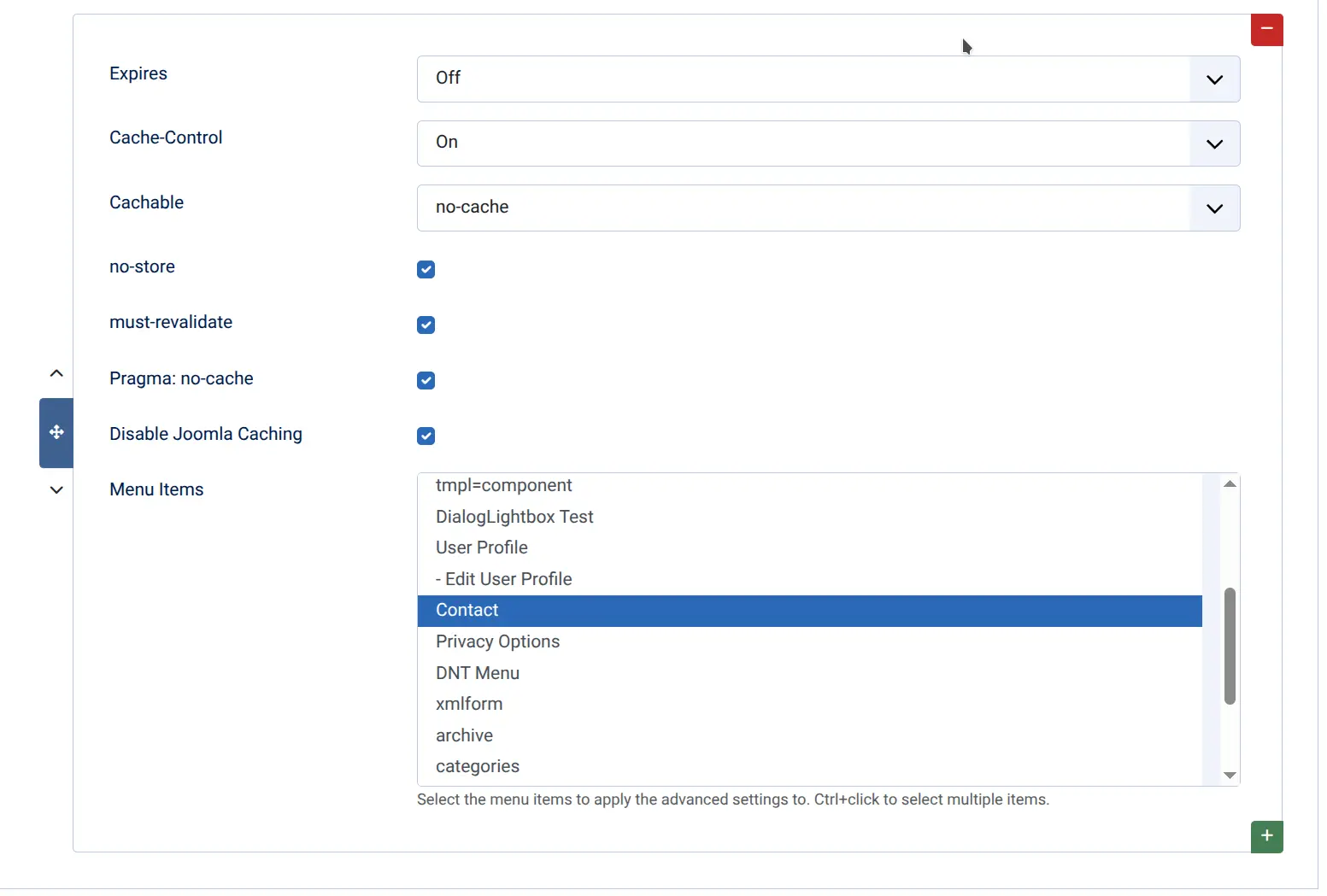
When/if you have enabled Joomla caching in Global Configuration, you may notice that Captcha - HashCash fails intermittently. This is because the source of the hash (IP address and timestamp) are cached by Joomla until the cache expires or until the page is re-cached as the result of a POST.
If you experience this, the solution is quite simple. Install my [System - Expires Headers](/software/joomla/plugins/system-expires-headers) plugin and create a menu item configuration. Within that configuration, set the menu item as below - specifically activating Disable Joomla Caching checkbox.
## Decorate Your Form
To decorate your form, you will need to know the form context (the option and the view), for example option=com\_contact&view=contact and create a javascript file.
When correctly named (option.view.js and option.view.min.js) is present in /media/plg\_captcha\_hashcash/js - the plugin will automatically load it when in that form context. See /media/plg\_captcha\_hashcash/js/com\_contact.contact.js for an example.
### Basic JavaScript structure:
```
const plg_captcha_hashcash_option_view_class = function() {
const root = this;
const construct = function() {
// do stuff to decorate the form
window.addEventListener('plg_captcha_hashcash_finished', () => {
// do stuff to un-decorate the form
});
}
construct();
}
window.addEventListener('DOMContentLoaded', () => {
new plg_captcha_hashcash_option_view_class();
});
```
## Error Messages
To prevent giving attackers too much information, there is only one error message this plugin will display:
Security validation failed. You may have waited too long to submit the form.
The plugin may block based on many factors, bot browser detected - TOR node, DNS Blacklist. If you receive the above error, you may consider disabling some of the features to determine if you're being detected or blocked by these filters.
- [ email ](mailto:?subject=Captcha+-+HashCash+Documentation&body=https%3A%2F%2Fwww.richeyweb.com%2Fsoftware%2Fdocumentation%2Fcaptcha-hashcash)
- [ facebook ](https://www.facebook.com/sharer/sharer.php?u=https%3A%2F%2Fwww.richeyweb.com%2Fsoftware%2Fdocumentation%2Fcaptcha-hashcash)
- [ x-twitter ](https://twitter.com/intent/tweet?text=Captcha+-+HashCash+Documentation%3A+https%3A%2F%2Fwww.richeyweb.com%2Fsoftware%2Fdocumentation%2Fcaptcha-hashcash)
- [ linkedin ](http://www.linkedin.com/shareArticle?mini=true&url=https%3A%2F%2Fwww.richeyweb.com%2Fsoftware%2Fdocumentation%2Fcaptcha-hashcash&title=Captcha+-+HashCash+Documentation&summary=Overview+Finally%2C+a+CAPTCHA+you+can%E2%80%99t+read%E2%80%94because...)
- [ pinterest ](http://pinterest.com/pin/create/button/?url=https%3A%2F%2Fwww.richeyweb.com%2Fsoftware%2Fdocumentation%2Fcaptcha-hashcash&media=https%3A%2F%2Fwww.richeyweb.com%2Fimages%2Farticles%2Fplg_captcha_hashcash%2Fexpires-headers-caching.webp&description=Captcha+-+HashCash+Documentation)
[ Previous article: Authentication - Session Limit Documentation Authentication - Session Limit Documentation ](/software/documentation/authentication-session-limit) [ Next article: CLI - Reminder Documentation CLI - Reminder Documentation ](/software/documentation/cli-reminder)
##### We Value Your Privacy
We use cookies to enhance your experience and for traffic analysis. By continuing to visit this site you agree to our use of cookies.
[Privacy Policy](/privacy-policy)
Details
###### Google Tag Manager Items
- Ad Storage
- Ad User Data
- Ad Personalization
- Analytics Storage
- Functionality Storage
- Personalization Storage
- Security Storage
Decline Accept
```json
{"@context":"https://schema.org","@graph":[{"@type":"Organization","@id":"https://www.richeyweb.com/#organization","name":"RicheyWeb","url":"https://www.richeyweb.com/","logo":{"@type":"ImageObject","url":"https://www.richeyweb.com/images/logo/richeyweb.svg","contentUrl":"https://www.richeyweb.com/images/logo/richeyweb.svg","width":{"@type":"QuantitativeValue","value":38,"unitCode":"PX"},"height":{"@type":"QuantitativeValue","value":38,"unitCode":"PX"},"@id":"https://www.richeyweb.com/#logo"},"image":{"@id":"https://www.richeyweb.com/#logo"},"sameAs":["https://x.com/ComRicheyweb","https://www.facebook.com/RicheyWebDev/","https://www.youtube.com/channel/UCxnVG8BwOvQRO7hVqNX7T2g","https://community.joomla.org/service-providers-directory/listings/115:richeyweb.html"],"description":"RicheyWeb is a custom software developer specializing in Joomla extensions.","ContactPoint":[{"@type":"ContactPoint","url":"https://www.richeyweb.com/contact-us","telephone":"903-873-8460","contactType":"Owner/Administrator","areaServed":["United States",{"@type":"Country","name":"United States","sameAs":["https://en.wikipedia.org/wiki/United_States","https://www.wikidata.org/wiki/Q30","https://g.co/kg/m/09c7w0"]},"European Union",{"@type":"AdministrativeArea","name":"European Union","sameAs":["https://en.wikipedia.org/wiki/European_Union","https://www.wikidata.org/wiki/Q458","https://g.co/kg/m/0_6t_z8"]},"United Kingdom",{"@type":"Country","name":"United Kingdom","sameAs":["https://en.wikipedia.org/wiki/United_Kingdom","https://www.wikidata.org/wiki/Q145","https://g.co/kg/m/07ssc"]},"Australia",{"@type":"Country","name":"Australia","sameAs":["https://en.wikipedia.org/wiki/Australia","https://www.wikidata.org/wiki/Q408","https://g.co/kg/m/0chghy"]},"Canada",{"@type":"Country","name":"Canada","sameAs":["https://en.wikipedia.org/wiki/Canada","https://www.wikidata.org/wiki/Q16","https://g.co/kg/m/0d060g"]},"Russia",{"@type":"Country","name":"Russia","sameAs":["https://en.wikipedia.org/wiki/Russia","https://www.wikidata.org/wiki/Q159","https://g.co/kg/m/06bnz"]},"China",{"@type":"Country","name":"China","sameAs":["https://en.wikipedia.org/wiki/China","https://www.wikidata.org/wiki/Q148","https://g.co/kg/m/0d05w3"]}],"availableLanguage":"en"},{"@type":"ContactPoint","url":"https://www.richeyweb.com/bugs","telephone":"903-873-8460","contactType":"Technical Support","areaServed":["United States",{"@type":"Country","name":"United States","sameAs":["https://en.wikipedia.org/wiki/United_States","https://www.wikidata.org/wiki/Q30","https://g.co/kg/m/09c7w0"]},"European Union",{"@type":"AdministrativeArea","name":"European Union","sameAs":["https://en.wikipedia.org/wiki/European_Union","https://www.wikidata.org/wiki/Q458","https://g.co/kg/m/0_6t_z8"]},"United Kingdom",{"@type":"Country","name":"United Kingdom","sameAs":["https://en.wikipedia.org/wiki/United_Kingdom","https://www.wikidata.org/wiki/Q145","https://g.co/kg/m/07ssc"]},"Australia",{"@type":"Country","name":"Australia","sameAs":["https://en.wikipedia.org/wiki/Australia","https://www.wikidata.org/wiki/Q408","https://g.co/kg/m/0chghy"]},"Canada",{"@type":"Country","name":"Canada","sameAs":["https://en.wikipedia.org/wiki/Canada","https://www.wikidata.org/wiki/Q16","https://g.co/kg/m/0d060g"]},"Russia",{"@type":"Country","name":"Russia","sameAs":["https://en.wikipedia.org/wiki/Russia","https://www.wikidata.org/wiki/Q159","https://g.co/kg/m/06bnz"]},"China",{"@type":"Country","name":"China","sameAs":["https://en.wikipedia.org/wiki/China","https://www.wikidata.org/wiki/Q148","https://g.co/kg/m/0d05w3"]}],"availableLanguage":"en"}],"knowsAbout":["Computer programming",{"@type":"Thing","name":"Computer programming","sameAs":["https://en.wikipedia.org/wiki/Computer_programming","https://www.wikidata.org/wiki/Q80006","https://g.co/kg/m/01mf_"]},"PHP",{"@type":"Thing","name":"PHP","sameAs":["https://en.wikipedia.org/wiki/PHP","https://www.wikidata.org/wiki/Q59","https://g.co/kg/m/060kv"]},"JavaScript",{"@type":"Thing","name":"JavaScript","sameAs":["https://en.wikipedia.org/wiki/JavaScript","https://www.wikidata.org/wiki/Q2005","https://g.co/kg/m/02p97"]},"arduino","Computer forensics",{"@type":"Thing","name":"Computer forensics","sameAs":["https://en.wikipedia.org/wiki/Computer_forensics","https://www.wikidata.org/wiki/Q878553","https://g.co/kg/m/02wxbd"]},"White hat",{"@type":"Thing","name":"White hat","sameAs":["https://en.wikipedia.org/wiki/White_hat_(computer_security)","https://www.wikidata.org/wiki/Q7995625","https://g.co/kg/m/03ns_5"]},"Search engine optimization",{"@type":"Thing","name":"Search engine optimization","sameAs":["https://en.wikipedia.org/wiki/Search_engine_optimization","https://www.wikidata.org/wiki/Q180711","https://g.co/kg/m/019qb_"]},"Search engine marketing",{"@type":"Thing","name":"Search engine marketing","sameAs":["https://en.wikipedia.org/wiki/Search_engine_marketing","https://www.wikidata.org/wiki/Q846132","https://g.co/kg/m/06mw8r"]},"Digital marketing",{"@type":"Thing","name":"Digital marketing","sameAs":["https://en.wikipedia.org/wiki/Digital_marketing","https://www.wikidata.org/wiki/Q1323528","https://g.co/kg/g/122hcnps"]},"Web hosting service",{"@type":"Thing","name":"Web hosting service","sameAs":["https://en.wikipedia.org/wiki/Web_hosting_service","https://www.wikidata.org/wiki/Q5892272","https://g.co/kg/m/014pz4"]},"Email hosting service",{"@type":"Thing","name":"Email hosting service","sameAs":["https://en.wikipedia.org/wiki/Email_hosting_service","https://www.wikidata.org/wiki/Q5368818","https://g.co/kg/m/09w60m"]},"Internet hosting service",{"@type":"Thing","name":"Internet hosting service","sameAs":["https://en.wikipedia.org/wiki/Internet_hosting_service","https://www.wikidata.org/wiki/Q1210425","https://g.co/kg/m/09w5yw"]},"Virtual hosting",{"@type":"Thing","name":"Virtual hosting","sameAs":["https://en.wikipedia.org/wiki/Virtual_hosting","https://www.wikidata.org/wiki/Q588365","https://g.co/kg/m/024mvh"]},"Web performance",{"@type":"Thing","name":"Web performance","sameAs":["https://en.wikipedia.org/wiki/Web_performance","https://www.wikidata.org/wiki/Q7978612","https://g.co/kg/m/0gfj3f1"]},"Web content management system",{"@type":"Thing","name":"Web content management system","sameAs":["https://en.wikipedia.org/wiki/Web_content_management_system","https://www.wikidata.org/wiki/Q45211","https://g.co/kg/m/0615s2"]},"Content management system",{"@type":"Thing","name":"Content management system","sameAs":["https://en.wikipedia.org/wiki/Content_management_system","https://www.wikidata.org/wiki/Q131093","https://g.co/kg/m/0k23c"]},"General Data Protection Regulation",{"@type":"Thing","name":"General Data Protection Regulation","sameAs":["https://en.wikipedia.org/wiki/General_Data_Protection_Regulation","https://www.wikidata.org/wiki/Q1172506","https://g.co/kg/m/0pk_7xs"]},"SERP",{"@type":"Thing","name":"SERP","sameAs":["https://en.wikipedia.org/wiki/SERP","https://www.wikidata.org/wiki/Q2205811","https://g.co/kg/g/11c5szp7kc"]},"Artificial intelligence",{"@type":"Thing","name":"Artificial intelligence","sameAs":["https://en.wikipedia.org/wiki/Artificial_intelligence","https://www.wikidata.org/wiki/Q11660","https://g.co/kg/m/0mkz"]},"Prompt engineering",{"@type":"Thing","name":"Prompt engineering","sameAs":["https://en.wikipedia.org/wiki/Prompt_engineering","https://www.wikidata.org/wiki/Q108941486","https://g.co/kg/g/11p6kpgt_n"]},"E-learning",{"@type":"Thing","name":"E-learning","sameAs":["https://en.wikipedia.org/wiki/E-learning_(theory)","https://www.wikidata.org/wiki/Q182250","https://g.co/kg/g/122czm1f"]},"Sharable Content Object Reference Model",{"@type":"Thing","name":"Sharable Content Object Reference Model","sameAs":["https://en.wikipedia.org/wiki/Sharable_Content_Object_Reference_Model","https://www.wikidata.org/wiki/Q827811","https://g.co/kg/m/06_40"]},"Experience API",{"@type":"Thing","name":"Experience API","sameAs":["https://en.wikipedia.org/wiki/Experience_API","https://www.wikidata.org/wiki/Q7807728","https://g.co/kg/g/1yw9ktxr8"]},"Joomla",{"@type":"Thing","name":"Joomla","sameAs":["https://en.wikipedia.org/wiki/Joomla","https://www.wikidata.org/wiki/Q13167","https://g.co/kg/m/07qb81"]},"Nginx",{"@type":"Thing","name":"Nginx","sameAs":["https://en.wikipedia.org/wiki/Nginx","https://www.wikidata.org/wiki/Q306144","https://g.co/kg/m/02qft91"]},"MySQL",{"@type":"Thing","name":"MySQL","sameAs":["https://en.wikipedia.org/wiki/MySQL","https://www.wikidata.org/wiki/Q850","https://g.co/kg/m/04y3k"]}],"areaServed":["United States",{"@type":"Country","name":"United States","sameAs":["https://en.wikipedia.org/wiki/United_States","https://www.wikidata.org/wiki/Q30","https://g.co/kg/m/09c7w0"]},"European Union",{"@type":"AdministrativeArea","name":"European Union","sameAs":["https://en.wikipedia.org/wiki/European_Union","https://www.wikidata.org/wiki/Q458","https://g.co/kg/m/0_6t_z8"]},"United Kingdom",{"@type":"Country","name":"United Kingdom","sameAs":["https://en.wikipedia.org/wiki/United_Kingdom","https://www.wikidata.org/wiki/Q145","https://g.co/kg/m/07ssc"]},"Australia",{"@type":"Country","name":"Australia","sameAs":["https://en.wikipedia.org/wiki/Australia","https://www.wikidata.org/wiki/Q408","https://g.co/kg/m/0chghy"]},"Canada",{"@type":"Country","name":"Canada","sameAs":["https://en.wikipedia.org/wiki/Canada","https://www.wikidata.org/wiki/Q16","https://g.co/kg/m/0d060g"]},"Russia",{"@type":"Country","name":"Russia","sameAs":["https://en.wikipedia.org/wiki/Russia","https://www.wikidata.org/wiki/Q159","https://g.co/kg/m/06bnz"]},"China",{"@type":"Country","name":"China","sameAs":["https://en.wikipedia.org/wiki/China","https://www.wikidata.org/wiki/Q148","https://g.co/kg/m/0d05w3"]}],"memberOf":["Mensa International",{"@type":"Organization","name":"Mensa International","sameAs":["https://en.wikipedia.org/wiki/Mensa_International","https://www.wikidata.org/wiki/Q184194","https://g.co/kg/m/0140pf"]},"National Rifle Association",{"@type":"Organization","name":"National Rifle Association","sameAs":["https://en.wikipedia.org/wiki/National_Rifle_Association","https://www.wikidata.org/wiki/Q863259","https://g.co/kg/m/0j6f9"]},"CompTIA",{"@type":"Organization","name":"CompTIA","sameAs":["https://en.wikipedia.org/wiki/CompTIA","https://www.wikidata.org/wiki/Q597534","https://g.co/kg/m/040shq"]},"ISFCE LLC",{"@type":"Organization","name":"ISFCE LLC","sameAs":["https://isfce.com","https://g.co/kg/g/11wxm5r0rg"]}],"hasCredential":[{"@type":"EducationalOccupationalCredential","name":"Joomla 3 Certified Administrator","credentialCategory":"Certification","description":"Administrator Exam is the first available Joomla! certification exam","recognizedBy":{"@type":"Organization","name":"Open Source Matters, Inc.","sameAs":["https://en.wikipedia.org/wiki/Open_Source_Matters,_Inc.","https://g.co/kg/g/11f00wvjhz"]},"url":"https://certification.joomla.org/certified-user-directory/michael-richey","about":["Content management system",{"@type":"Thing","name":"Content management system","sameAs":["https://en.wikipedia.org/wiki/Content_management_system","https://www.wikidata.org/wiki/Q131093","https://g.co/kg/m/0k23c"]},"Web content management system",{"@type":"Thing","name":"Web content management system","sameAs":["https://en.wikipedia.org/wiki/Web_content_management_system","https://www.wikidata.org/wiki/Q45211","https://g.co/kg/m/0615s2"]},"Joomla",{"@type":"Thing","name":"Joomla","sameAs":["https://en.wikipedia.org/wiki/Joomla","https://www.wikidata.org/wiki/Q13167","https://g.co/kg/m/07qb81"]}],"educationalLevel":"expert","image":{"@type":"ImageObject","url":"https://www.richeyweb.com/images/contact/badge.webp","contentUrl":"https://www.richeyweb.com/images/contact/badge.webp","width":{"@type":"QuantitativeValue","value":300,"unitCode":"PX"},"height":{"@type":"QuantitativeValue","value":86,"unitCode":"PX"},"caption":"Joomla 3 Certified Administrator"}},{"@type":"EducationalOccupationalCredential","name":"Certified Computer Examiner","credentialCategory":"Certification","description":"Internationally recognized computer forensics certifiecation","recognizedBy":{"@type":"Organization","name":"ISFCE LLC","sameAs":["https://en.wikipedia.org/wiki/ISFCE_LLC","https://g.co/kg/g/11wxm5r0rg"]},"url":"https://isfce.com/","about":["Digital forensics",{"@type":"Thing","name":"Digital forensics","sameAs":["https://en.wikipedia.org/wiki/Digital_forensics","https://www.wikidata.org/wiki/Q3246940","https://g.co/kg/m/0cnxzfx"]},"Computer forensics",{"@type":"Thing","name":"Computer forensics","sameAs":["https://en.wikipedia.org/wiki/Computer_forensics","https://www.wikidata.org/wiki/Q878553","https://g.co/kg/m/02wxbd"]},"Mobile device forensics",{"@type":"Thing","name":"Mobile device forensics","sameAs":["https://en.wikipedia.org/wiki/Mobile_device_forensics","https://www.wikidata.org/wiki/Q6887097","https://g.co/kg/m/06zp3tp"]},"Network forensics",{"@type":"Thing","name":"Network forensics","sameAs":["https://en.wikipedia.org/wiki/Network_forensics","https://www.wikidata.org/wiki/Q7001032","https://g.co/kg/m/05pb280"]},"Database forensics",{"@type":"Thing","name":"Database forensics","sameAs":["https://en.wikipedia.org/wiki/Database_forensics","https://www.wikidata.org/wiki/Q5227405","https://g.co/kg/m/0cgqsy"]}],"educationalLevel":"expert","image":{"@type":"ImageObject","url":"https://www.richeyweb.com/images/contact/isfce-cce.webp","contentUrl":"https://www.richeyweb.com/images/contact/isfce-cce.webp","width":{"@type":"QuantitativeValue","value":150,"unitCode":"PX"},"height":{"@type":"QuantitativeValue","value":150,"unitCode":"PX"},"caption":"Certified Computer Examiner"}}],"hasOfferCatalog":{"@type":"OfferCatalog","name":"Web Services","itemListElement":[{"@type":"Offer","itemOffered":{"@type":"Service","name":"Hosting"}},{"@type":"Offer","itemOffered":{"@type":"Service","name":"Development"}},{"@type":"Offer","itemOffered":{"@type":"Service","name":"Search Engine Optimization"}}]}},{"@type":"WebSite","@id":"https://www.richeyweb.com/#website","url":"https://www.richeyweb.com/","name":"RicheyWeb","publisher":{"@id":"https://www.richeyweb.com/#organization"},"potentialAction":{"@type":"SearchAction","target":{"@type":"EntryPoint","urlTemplate":"https://www.richeyweb.com/search?q={search_term_string}"},"query-input":{"@type":"PropertyValueSpecification","valueRequired":true,"valueName":"search_term_string","valueMaxLength":256,"valueMinLength":2,"valuePattern":"^[A-Za-z0-9\\s]+$"}},"creator":{"@id":"https://www.richeyweb.com/#organization"},"copyrightHolder":{"@id":"https://www.richeyweb.com/#organization"}},{"@type":"WebPage","@id":"https://www.richeyweb.com/software/documentation/captcha-hashcash#webpage","url":"https://www.richeyweb.com/software/documentation/captcha-hashcash","name":"Captcha - HashCash Documentation","description":"Captcha - HashCash documentation","isPartOf":{"@id":"https://www.richeyweb.com/#website"},"about":{"@id":"https://www.richeyweb.com/#organization"},"inLanguage":"en-GB"},{"@type":"Article","headline":"Captcha - HashCash Documentation","description":"Captcha - HashCash documentation","author":{"@type":"Person","name":"Michael Richey","url":"https://www.richeyweb.com/contact-us","@id":"https://www.richeyweb.com/contact-us#person"},"datePublished":"2025-01-16T00:00:00+00:00","dateModified":"2025-12-23T00:00:00+00:00","about":["Hashcash",{"@type":"Thing","name":"Hashcash","sameAs":["https://en.wikipedia.org/wiki/Hashcash","https://www.wikidata.org/wiki/Q357569","https://g.co/kg/m/02qsnf"]},"Adam Back",{"@type":"Person","name":"Adam Back","sameAs":["https://en.wikipedia.org/wiki/Adam_Back","https://www.wikidata.org/wiki/Q348671","https://g.co/kg/m/02q93bn"]},"Proof of work",{"@type":"Thing","name":"Proof of work","sameAs":["https://en.wikipedia.org/wiki/Proof_of_work","https://www.wikidata.org/wiki/Q7249984","https://g.co/kg/m/05bdrw"]},"Web Cryptography API",{"@type":"Thing","name":"Web Cryptography API","sameAs":["https://en.wikipedia.org/wiki/Web_Cryptography_API","https://www.wikidata.org/wiki/Q30688210","https://g.co/kg/g/11dy_ksq2m"]},"PBKDF2",{"@type":"Thing","name":"PBKDF2","sameAs":["https://en.wikipedia.org/wiki/PBKDF2","https://www.wikidata.org/wiki/Q3952834","https://g.co/kg/m/05c24s"]},"Secure Hash Algorithms",{"@type":"Thing","name":"Secure Hash Algorithms","sameAs":["https://en.wikipedia.org/wiki/Secure_Hash_Algorithms","https://www.wikidata.org/wiki/Q387688","https://g.co/kg/m/0vpn3kv"]},"Captcha - HashCash",{"@type":"Thing","@id":"https://www.richeyweb.com/software/joomla/plugins/captcha-hashcash/#softwareapplication","name":"Captcha - HashCash","sameAs":["https://extensions.joomla.org/extension/access-a-security/site-security/hashcash/","https://en.wikipedia.org/wiki/Captcha_-_HashCash"]},"Technical documentation",{"@type":"Thing","name":"Technical documentation","sameAs":["https://en.wikipedia.org/wiki/Technical_documentation","https://www.wikidata.org/wiki/Q1413406","https://g.co/kg/m/0521g6n"]}],"mentions":["Content management system",{"@type":"Thing","name":"Content management system","sameAs":["https://en.wikipedia.org/wiki/Content_management_system","https://www.wikidata.org/wiki/Q131093","https://g.co/kg/m/0k23c"]},"Joomla",{"@type":"Thing","name":"Joomla","sameAs":["https://en.wikipedia.org/wiki/Joomla","https://www.wikidata.org/wiki/Q13167","https://g.co/kg/m/07qb81"]},"Plug-in",{"@type":"Thing","name":"Plug-in","sameAs":["https://en.wikipedia.org/wiki/Plug-in_(computing)","https://www.wikidata.org/wiki/Q3906765","https://g.co/kg/m/05x35"]},"Computer security",{"@type":"Thing","name":"Computer security","sameAs":["https://en.wikipedia.org/wiki/Computer_security","https://www.wikidata.org/wiki/Q3510521","https://g.co/kg/m/022x_"]},"General Data Protection Regulation",{"@type":"Book","name":"General Data Protection Regulation","sameAs":["https://en.wikipedia.org/wiki/General_Data_Protection_Regulation","https://www.wikidata.org/wiki/Q1172506","https://g.co/kg/m/0pk_7xs"]},"Hashcash",{"@type":"Thing","name":"Hashcash","sameAs":["https://en.wikipedia.org/wiki/Hashcash","https://www.wikidata.org/wiki/Q357569","https://g.co/kg/m/02qsnf"]}],"@id":"https://www.richeyweb.com/software/documentation/captcha-hashcash#article","isPartOf":{"@id":"https://www.richeyweb.com/software/documentation/captcha-hashcash#webpage"},"publisher":{"@id":"https://www.richeyweb.com/#organization"},"articleSection":"Documentation","url":"https://www.richeyweb.com/software/documentation/captcha-hashcash","hasPart":[{"@id":"https://www.richeyweb.com/software/documentation/captcha-hashcash#articleindex-toc-overview_2_1"},{"@id":"https://www.richeyweb.com/software/documentation/captcha-hashcash#articleindex-toc-installation_2_2"},{"@id":"https://www.richeyweb.com/software/documentation/captcha-hashcash#articleindex-toc-configuration_2_3"},{"@id":"https://www.richeyweb.com/software/documentation/captcha-hashcash#articleindex-toc-using-hashcash-with-joomla-caching_2_4"},{"@id":"https://www.richeyweb.com/software/documentation/captcha-hashcash#articleindex-toc-decorate-your-form_2_5"},{"@id":"https://www.richeyweb.com/software/documentation/captcha-hashcash#articleindex-toc-basic-javascript-structure_3_6"},{"@id":"https://www.richeyweb.com/software/documentation/captcha-hashcash#articleindex-toc-error-messages_2_7"}]},{"@id":"https://www.richeyweb.com/software/documentation/captcha-hashcash#articleindex","@type":"ItemList","name":"Captcha - HashCash Documentation","numberOfItems":7,"itemListElement":[{"@type":"ListItem","position":1,"item":{"@type":"WPHeader","@id":"https://www.richeyweb.com/software/documentation/captcha-hashcash#articleindex-toc-overview_2_1","name":"Overview","url":"https://www.richeyweb.com/software/documentation/captcha-hashcash#toc-overview_2_1"}},{"@type":"ListItem","position":2,"item":{"@type":"WPHeader","@id":"https://www.richeyweb.com/software/documentation/captcha-hashcash#articleindex-toc-installation_2_2","name":"Installation","url":"https://www.richeyweb.com/software/documentation/captcha-hashcash#toc-installation_2_2"}},{"@type":"ListItem","position":3,"item":{"@type":"WPHeader","@id":"https://www.richeyweb.com/software/documentation/captcha-hashcash#articleindex-toc-configuration_2_3","name":"Configuration","url":"https://www.richeyweb.com/software/documentation/captcha-hashcash#toc-configuration_2_3"}},{"@type":"ListItem","position":4,"item":{"@type":"WPHeader","@id":"https://www.richeyweb.com/software/documentation/captcha-hashcash#articleindex-toc-using-hashcash-with-joomla-caching_2_4","name":"Using HashCash With Joomla Caching","url":"https://www.richeyweb.com/software/documentation/captcha-hashcash#toc-using-hashcash-with-joomla-caching_2_4"}},{"@type":"ListItem","position":5,"item":{"@type":"WPHeader","@id":"https://www.richeyweb.com/software/documentation/captcha-hashcash#articleindex-toc-decorate-your-form_2_5","name":"Decorate Your Form","url":"https://www.richeyweb.com/software/documentation/captcha-hashcash#toc-decorate-your-form_2_5"}},{"@type":"ListItem","position":6,"item":{"@type":"WPHeader","@id":"https://www.richeyweb.com/software/documentation/captcha-hashcash#articleindex-toc-basic-javascript-structure_3_6","name":"Basic JavaScript structure:","url":"https://www.richeyweb.com/software/documentation/captcha-hashcash#toc-basic-javascript-structure_3_6"}},{"@type":"ListItem","position":7,"item":{"@type":"WPHeader","@id":"https://www.richeyweb.com/software/documentation/captcha-hashcash#articleindex-toc-error-messages_2_7","name":"Error Messages","url":"https://www.richeyweb.com/software/documentation/captcha-hashcash#toc-error-messages_2_7"}}]}]}
```