# Examples
## Tracking Spam Bots Like a Pro with GA and HashCash
- Extension Page: [Captcha - HashCash](/software/joomla/plugins/captcha-hashcash)
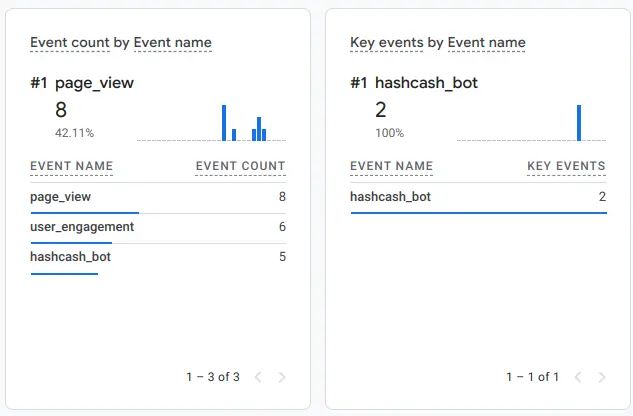 Forget bots vanishing after a failed attack. With [Captcha - HashCash](/software/joomla/plugins/captcha-hashcash)’s latest feature, every stumble turns into a clue you can track and outsmart. This isn’t just a CAPTCHA—it’s a bot-hunting machine that transforms your Joomla forms into a security goldmine. Imagine knowing who’s attacking, how they’re doing it, and where they’re hitting—all without bothering your users. That’s Detection Profiling, and it’s your key to staying ahead.
## The Power of Detection Profiling
### How It Works (Quick Recap)
HashCash already stops bots with its invisible, JavaScript-driven proof-of-work puzzle. The new twist? When a bot trips our detection—like faking an event that doesn’t bubble or isn’t trusted—we don’t just block it. We profile it. A CustomEvent fires, loaded with prefixed details: hashcash\_ip, hashcash\_ua, attack method, target form, and more. One line of code sends this intel to Google Analytics (GA), where the real fun starts.

## Setting Up Google Analytics: Step-by-Step
Ready to turn your Joomla site into a bot-tracking powerhouse? Outstanding! Of course, you'll need GA4 to do it, and if you need a plugin to help with that - check out my [System - Google Tag Manager](/software/joomla/plugins/system-google-tag-manager) plugin. Like all of my Joomla extensions, it's free.
Here’s how to hook HashCash into GA, updated for 2025’s interface:
1. Enable Custom Dimensions
- In GA: Admin > Data Display > Custom Definitions > Create Custom Dimension.
- Add these dimensions exactly as shown (Scope: Event, Active: Yes):
- HashCash Bot IP
Description: “IP address of the bot”
Parameter: hashcash\_ip
- HashCash Bot UA
Description: “User Agent of the bot”
Parameter: hashcash\_ua
- HashCash Bot Event
Description: “This tells us how the event was triggered. Values should be one of: Event, CustomEvent, or Object”
Parameter: hashcash\_event\_type
- HashCash Bot Target
Description: “This tells us which element was used to trigger the calculation to start. Only the form is allowed to trigger the calculation.”
Parameter: hashcash\_target
- HashCash Bot Bubbles
Description: “The change event must bubble from the input element to the form. If it didn’t bubble, it’s a bot. True/False value”
Parameter: hashcash\_bubbles
- HashCash Bot Trusted
Description: “Trusted events are those triggered by form interaction. If the event isn’t trusted, it was manually triggered (100% bot)”
Parameter: hashcash\_trusted
- HashCash Bot Nonce
Description: "Bot manipulated the hidden nonce field"
Parameter: hashcash\_nonce

2. Set Up the Event
- In GA: Admin > Data Display > Events > Create Event.
- Name: hashcash\_bot.
- Conditions: Set “event\_name” equals hashcash\_bot (matches your gtag("event", "hashcash\_bot", detail) call).
- Check “Copy parameters from the source event” (this grabs your hashcash\_ prefixed data automatically—no mapping needed).
- Save it. Your prefixed parameters keep everything tidy and conflict-free.

3. Add It as a Key Event
- In GA: Admin > Data Display > Key Events.
- Click “New key event.”
- Enter the event name: hashcash\_bot.
- Save. GA sets it up automatically as a key event for priority tracking in reports.
4. Add the Listener Code
- Slip this into your site (via a custom JS module or template override): ```
window.addEventListener("plg_captcha_hashcash", function(e) {
var detail = e.detail;
function gtag() {
window.dataLayer.push(arguments);
}
gtag("event", "hashcash_bot", detail);
});
```
- If GA’s tracking code is live (via your template or a plugin), this pushes the data automatically.
5. Test the Setup
- Using a standard Joomla contact form (with Captcha - HashCash installed, configured, enabled, and activated in Global Configuration), trigger bot detection like this: ```
document.getElementById('contact-form').dispatchEvent(new CustomEvent('change'));
```
- This fakes a bot action by firing a change event directly on the form (no bubbling, not trusted—pure bot bait).
- Warning: Your CPU will spike as HashCash’s bot trap kicks in (if the “Punish Bots” option is enabled). Refresh the page or close it to stop the spike.
- In GA: Realtime > Events. Look for hashcash\_bot and check the properties (e.g., hashcash\_ip, hashcash\_ua).
6. Build a Custom Report
- In GA: Reports > Library (at the very bottom of the menu, almost a footer) > Create new report > Create detail report > choose the first option “Blank.”
- Title: “HashCash Bot Tracking.”
- Type: Explorer.
- Metrics: Event Total.
- Dimensions: hashcash\_ip, hashcash\_event\_type, hashcash\_target.
- Filter: Include Event Category = hashcash\_bot.
- Save it. Now you’ve got a bot-tracking hub.
## Seeing the Magic: What You’ll Discover
Day one: A bot at 123.45.67.89 tries a non-trusted CustomEvent on your contact form—GA logs it. Day two: Same IP, new UA, hitting your bug report page with no bubbling. By week’s end, you’ve got a hit list: IPs to block, forms to reinforce, and a playbook of bot failures (non-trusted? Wrong target?). It’s not just data—it’s ammo. Crank up HashCash’s difficulty or let Splorkwizzle the Quack tally the wins.
## Why It Matters
This isn’t just a CAPTCHA—it’s a security sidekick that sharpens with every attack. Prove your site’s locked tight, spot threats early, and rest easy knowing you’re not just stopping bots—you’re tracking them like a pro. With HashCash and GA, you’re the one flipping on the lights.
- [ email ](mailto:?subject=Tracking+Spam+Bots+Like+a+Pro+with+GA+and+HashCash&body=https%3A%2F%2Fwww.richeyweb.com%2Fsoftware%2Fexamples%2Fhashcash%2Ftracking-spam-bots-like-a-pro-with-ga-and-hashcash)
- [ facebook ](https://www.facebook.com/sharer/sharer.php?u=https%3A%2F%2Fwww.richeyweb.com%2Fsoftware%2Fexamples%2Fhashcash%2Ftracking-spam-bots-like-a-pro-with-ga-and-hashcash)
- [ x-twitter ](https://twitter.com/intent/tweet?text=Tracking+Spam+Bots+Like+a+Pro+with+GA+and+HashCash%3A+https%3A%2F%2Fwww.richeyweb.com%2Fsoftware%2Fexamples%2Fhashcash%2Ftracking-spam-bots-like-a-pro-with-ga-and-hashcash)
- [ linkedin ](http://www.linkedin.com/shareArticle?mini=true&url=https%3A%2F%2Fwww.richeyweb.com%2Fsoftware%2Fexamples%2Fhashcash%2Ftracking-spam-bots-like-a-pro-with-ga-and-hashcash&title=Tracking+Spam+Bots+Like+a+Pro+with+GA+and+HashCash&summary=Forget+bots+vanishing+after+a+failed+attack.+With...)
- [ pinterest ](http://pinterest.com/pin/create/button/?url=https%3A%2F%2Fwww.richeyweb.com%2Fsoftware%2Fexamples%2Fhashcash%2Ftracking-spam-bots-like-a-pro-with-ga-and-hashcash&media=https%3A%2F%2Fwww.richeyweb.com%2Fimages%2Farticles%2Fplg_captcha_hashcash%2Fblog-post%2Fga-event.webp&description=Tracking+Spam+Bots+Like+a+Pro+with+GA+and+HashCash)
[ Previous article: Algorithm Options Explained for HashCash Algorithm Options Explained for HashCash ](/software/examples/hashcash/algorithm-options-explained-for-hashcash)
##### We Value Your Privacy
We use cookies to enhance your experience and for traffic analysis. By continuing to visit this site you agree to our use of cookies.
[Privacy Policy](/privacy-policy)
Details
###### Google Tag Manager Items
- Ad Storage
- Ad User Data
- Ad Personalization
- Analytics Storage
- Functionality Storage
- Personalization Storage
- Security Storage
Decline Accept
```json
{"@context":"https://schema.org","@graph":[{"@type":"Organization","@id":"https://www.richeyweb.com/#organization","name":"RicheyWeb","url":"https://www.richeyweb.com/","logo":{"@type":"ImageObject","url":"https://www.richeyweb.com/images/logo/richeyweb.svg","contentUrl":"https://www.richeyweb.com/images/logo/richeyweb.svg","width":{"@type":"QuantitativeValue","value":38,"unitCode":"PX"},"height":{"@type":"QuantitativeValue","value":38,"unitCode":"PX"},"@id":"https://www.richeyweb.com/#logo"},"image":{"@id":"https://www.richeyweb.com/#logo"},"sameAs":["https://x.com/ComRicheyweb","https://www.facebook.com/RicheyWebDev/","https://www.youtube.com/channel/UCxnVG8BwOvQRO7hVqNX7T2g","https://community.joomla.org/service-providers-directory/listings/115:richeyweb.html"],"description":"RicheyWeb is a custom software developer specializing in Joomla extensions.","ContactPoint":[{"@type":"ContactPoint","url":"https://www.richeyweb.com/contact-us","telephone":"903-873-8460","contactType":"Owner/Administrator","areaServed":["United States",{"@type":"Country","name":"United States","sameAs":["https://en.wikipedia.org/wiki/United_States","https://www.wikidata.org/wiki/Q30","https://g.co/kg/m/09c7w0"]},"European Union",{"@type":"AdministrativeArea","name":"European Union","sameAs":["https://en.wikipedia.org/wiki/European_Union","https://www.wikidata.org/wiki/Q458","https://g.co/kg/m/0_6t_z8"]},"United Kingdom",{"@type":"Country","name":"United Kingdom","sameAs":["https://en.wikipedia.org/wiki/United_Kingdom","https://www.wikidata.org/wiki/Q145","https://g.co/kg/m/07ssc"]},"Australia",{"@type":"Country","name":"Australia","sameAs":["https://en.wikipedia.org/wiki/Australia","https://www.wikidata.org/wiki/Q408","https://g.co/kg/m/0chghy"]},"Canada",{"@type":"Country","name":"Canada","sameAs":["https://en.wikipedia.org/wiki/Canada","https://www.wikidata.org/wiki/Q16","https://g.co/kg/m/0d060g"]},"Russia",{"@type":"Country","name":"Russia","sameAs":["https://en.wikipedia.org/wiki/Russia","https://www.wikidata.org/wiki/Q159","https://g.co/kg/m/06bnz"]},"China",{"@type":"Country","name":"China","sameAs":["https://en.wikipedia.org/wiki/China","https://www.wikidata.org/wiki/Q148","https://g.co/kg/m/0d05w3"]}],"availableLanguage":"en"},{"@type":"ContactPoint","url":"https://www.richeyweb.com/bugs","telephone":"903-873-8460","contactType":"Technical Support","areaServed":["United States",{"@type":"Country","name":"United States","sameAs":["https://en.wikipedia.org/wiki/United_States","https://www.wikidata.org/wiki/Q30","https://g.co/kg/m/09c7w0"]},"European Union",{"@type":"AdministrativeArea","name":"European Union","sameAs":["https://en.wikipedia.org/wiki/European_Union","https://www.wikidata.org/wiki/Q458","https://g.co/kg/m/0_6t_z8"]},"United Kingdom",{"@type":"Country","name":"United Kingdom","sameAs":["https://en.wikipedia.org/wiki/United_Kingdom","https://www.wikidata.org/wiki/Q145","https://g.co/kg/m/07ssc"]},"Australia",{"@type":"Country","name":"Australia","sameAs":["https://en.wikipedia.org/wiki/Australia","https://www.wikidata.org/wiki/Q408","https://g.co/kg/m/0chghy"]},"Canada",{"@type":"Country","name":"Canada","sameAs":["https://en.wikipedia.org/wiki/Canada","https://www.wikidata.org/wiki/Q16","https://g.co/kg/m/0d060g"]},"Russia",{"@type":"Country","name":"Russia","sameAs":["https://en.wikipedia.org/wiki/Russia","https://www.wikidata.org/wiki/Q159","https://g.co/kg/m/06bnz"]},"China",{"@type":"Country","name":"China","sameAs":["https://en.wikipedia.org/wiki/China","https://www.wikidata.org/wiki/Q148","https://g.co/kg/m/0d05w3"]}],"availableLanguage":"en"}],"knowsAbout":["Computer programming",{"@type":"Thing","name":"Computer programming","sameAs":["https://en.wikipedia.org/wiki/Computer_programming","https://www.wikidata.org/wiki/Q80006","https://g.co/kg/m/01mf_"]},"PHP",{"@type":"Thing","name":"PHP","sameAs":["https://en.wikipedia.org/wiki/PHP","https://www.wikidata.org/wiki/Q59","https://g.co/kg/m/060kv"]},"JavaScript",{"@type":"Thing","name":"JavaScript","sameAs":["https://en.wikipedia.org/wiki/JavaScript","https://www.wikidata.org/wiki/Q2005","https://g.co/kg/m/02p97"]},"arduino","Computer forensics",{"@type":"Thing","name":"Computer forensics","sameAs":["https://en.wikipedia.org/wiki/Computer_forensics","https://www.wikidata.org/wiki/Q878553","https://g.co/kg/m/02wxbd"]},"White hat",{"@type":"Thing","name":"White hat","sameAs":["https://en.wikipedia.org/wiki/White_hat_(computer_security)","https://www.wikidata.org/wiki/Q7995625","https://g.co/kg/m/03ns_5"]},"Search engine optimization",{"@type":"Thing","name":"Search engine optimization","sameAs":["https://en.wikipedia.org/wiki/Search_engine_optimization","https://www.wikidata.org/wiki/Q180711","https://g.co/kg/m/019qb_"]},"Search engine marketing",{"@type":"Thing","name":"Search engine marketing","sameAs":["https://en.wikipedia.org/wiki/Search_engine_marketing","https://www.wikidata.org/wiki/Q846132","https://g.co/kg/m/06mw8r"]},"Digital marketing",{"@type":"Thing","name":"Digital marketing","sameAs":["https://en.wikipedia.org/wiki/Digital_marketing","https://www.wikidata.org/wiki/Q1323528","https://g.co/kg/g/122hcnps"]},"Web hosting service",{"@type":"Thing","name":"Web hosting service","sameAs":["https://en.wikipedia.org/wiki/Web_hosting_service","https://www.wikidata.org/wiki/Q5892272","https://g.co/kg/m/014pz4"]},"Email hosting service",{"@type":"Thing","name":"Email hosting service","sameAs":["https://en.wikipedia.org/wiki/Email_hosting_service","https://www.wikidata.org/wiki/Q5368818","https://g.co/kg/m/09w60m"]},"Internet hosting service",{"@type":"Thing","name":"Internet hosting service","sameAs":["https://en.wikipedia.org/wiki/Internet_hosting_service","https://www.wikidata.org/wiki/Q1210425","https://g.co/kg/m/09w5yw"]},"Virtual hosting",{"@type":"Thing","name":"Virtual hosting","sameAs":["https://en.wikipedia.org/wiki/Virtual_hosting","https://www.wikidata.org/wiki/Q588365","https://g.co/kg/m/024mvh"]},"Web performance",{"@type":"Thing","name":"Web performance","sameAs":["https://en.wikipedia.org/wiki/Web_performance","https://www.wikidata.org/wiki/Q7978612","https://g.co/kg/m/0gfj3f1"]},"Web content management system",{"@type":"Thing","name":"Web content management system","sameAs":["https://en.wikipedia.org/wiki/Web_content_management_system","https://www.wikidata.org/wiki/Q45211","https://g.co/kg/m/0615s2"]},"Content management system",{"@type":"Thing","name":"Content management system","sameAs":["https://en.wikipedia.org/wiki/Content_management_system","https://www.wikidata.org/wiki/Q131093","https://g.co/kg/m/0k23c"]},"General Data Protection Regulation",{"@type":"Thing","name":"General Data Protection Regulation","sameAs":["https://en.wikipedia.org/wiki/General_Data_Protection_Regulation","https://www.wikidata.org/wiki/Q1172506","https://g.co/kg/m/0pk_7xs"]},"SERP",{"@type":"Thing","name":"SERP","sameAs":["https://en.wikipedia.org/wiki/SERP","https://www.wikidata.org/wiki/Q2205811","https://g.co/kg/g/11c5szp7kc"]},"Artificial intelligence",{"@type":"Thing","name":"Artificial intelligence","sameAs":["https://en.wikipedia.org/wiki/Artificial_intelligence","https://www.wikidata.org/wiki/Q11660","https://g.co/kg/m/0mkz"]},"Prompt engineering",{"@type":"Thing","name":"Prompt engineering","sameAs":["https://en.wikipedia.org/wiki/Prompt_engineering","https://www.wikidata.org/wiki/Q108941486","https://g.co/kg/g/11p6kpgt_n"]},"E-learning",{"@type":"Thing","name":"E-learning","sameAs":["https://en.wikipedia.org/wiki/E-learning_(theory)","https://www.wikidata.org/wiki/Q182250","https://g.co/kg/g/122czm1f"]},"Sharable Content Object Reference Model",{"@type":"Thing","name":"Sharable Content Object Reference Model","sameAs":["https://en.wikipedia.org/wiki/Sharable_Content_Object_Reference_Model","https://www.wikidata.org/wiki/Q827811","https://g.co/kg/m/06_40"]},"Experience API",{"@type":"Thing","name":"Experience API","sameAs":["https://en.wikipedia.org/wiki/Experience_API","https://www.wikidata.org/wiki/Q7807728","https://g.co/kg/g/1yw9ktxr8"]},"Joomla",{"@type":"Thing","name":"Joomla","sameAs":["https://en.wikipedia.org/wiki/Joomla","https://www.wikidata.org/wiki/Q13167","https://g.co/kg/m/07qb81"]},"Nginx",{"@type":"Thing","name":"Nginx","sameAs":["https://en.wikipedia.org/wiki/Nginx","https://www.wikidata.org/wiki/Q306144","https://g.co/kg/m/02qft91"]},"MySQL",{"@type":"Thing","name":"MySQL","sameAs":["https://en.wikipedia.org/wiki/MySQL","https://www.wikidata.org/wiki/Q850","https://g.co/kg/m/04y3k"]}],"areaServed":["United States",{"@type":"Country","name":"United States","sameAs":["https://en.wikipedia.org/wiki/United_States","https://www.wikidata.org/wiki/Q30","https://g.co/kg/m/09c7w0"]},"European Union",{"@type":"AdministrativeArea","name":"European Union","sameAs":["https://en.wikipedia.org/wiki/European_Union","https://www.wikidata.org/wiki/Q458","https://g.co/kg/m/0_6t_z8"]},"United Kingdom",{"@type":"Country","name":"United Kingdom","sameAs":["https://en.wikipedia.org/wiki/United_Kingdom","https://www.wikidata.org/wiki/Q145","https://g.co/kg/m/07ssc"]},"Australia",{"@type":"Country","name":"Australia","sameAs":["https://en.wikipedia.org/wiki/Australia","https://www.wikidata.org/wiki/Q408","https://g.co/kg/m/0chghy"]},"Canada",{"@type":"Country","name":"Canada","sameAs":["https://en.wikipedia.org/wiki/Canada","https://www.wikidata.org/wiki/Q16","https://g.co/kg/m/0d060g"]},"Russia",{"@type":"Country","name":"Russia","sameAs":["https://en.wikipedia.org/wiki/Russia","https://www.wikidata.org/wiki/Q159","https://g.co/kg/m/06bnz"]},"China",{"@type":"Country","name":"China","sameAs":["https://en.wikipedia.org/wiki/China","https://www.wikidata.org/wiki/Q148","https://g.co/kg/m/0d05w3"]}],"memberOf":["Mensa International",{"@type":"Organization","name":"Mensa International","sameAs":["https://en.wikipedia.org/wiki/Mensa_International","https://www.wikidata.org/wiki/Q184194","https://g.co/kg/m/0140pf"]},"National Rifle Association",{"@type":"Organization","name":"National Rifle Association","sameAs":["https://en.wikipedia.org/wiki/National_Rifle_Association","https://www.wikidata.org/wiki/Q863259","https://g.co/kg/m/0j6f9"]},"CompTIA",{"@type":"Organization","name":"CompTIA","sameAs":["https://en.wikipedia.org/wiki/CompTIA","https://www.wikidata.org/wiki/Q597534","https://g.co/kg/m/040shq"]},"ISFCE LLC",{"@type":"Organization","name":"ISFCE LLC","sameAs":["https://isfce.com","https://g.co/kg/g/11wxm5r0rg"]}],"hasCredential":[{"@type":"EducationalOccupationalCredential","name":"Joomla 3 Certified Administrator","credentialCategory":"Certification","description":"Administrator Exam is the first available Joomla! certification exam","recognizedBy":{"@type":"Organization","name":"Open Source Matters, Inc.","sameAs":["https://en.wikipedia.org/wiki/Open_Source_Matters,_Inc.","https://g.co/kg/g/11f00wvjhz"]},"url":"https://certification.joomla.org/certified-user-directory/michael-richey","about":["Content management system",{"@type":"Thing","name":"Content management system","sameAs":["https://en.wikipedia.org/wiki/Content_management_system","https://www.wikidata.org/wiki/Q131093","https://g.co/kg/m/0k23c"]},"Web content management system",{"@type":"Thing","name":"Web content management system","sameAs":["https://en.wikipedia.org/wiki/Web_content_management_system","https://www.wikidata.org/wiki/Q45211","https://g.co/kg/m/0615s2"]},"Joomla",{"@type":"Thing","name":"Joomla","sameAs":["https://en.wikipedia.org/wiki/Joomla","https://www.wikidata.org/wiki/Q13167","https://g.co/kg/m/07qb81"]}],"educationalLevel":"expert","image":{"@type":"ImageObject","url":"https://www.richeyweb.com/images/contact/badge.webp","contentUrl":"https://www.richeyweb.com/images/contact/badge.webp","width":{"@type":"QuantitativeValue","value":300,"unitCode":"PX"},"height":{"@type":"QuantitativeValue","value":86,"unitCode":"PX"},"caption":"Joomla 3 Certified Administrator"}},{"@type":"EducationalOccupationalCredential","name":"Certified Computer Examiner","credentialCategory":"Certification","description":"Internationally recognized computer forensics certifiecation","recognizedBy":{"@type":"Organization","name":"ISFCE LLC","sameAs":["https://en.wikipedia.org/wiki/ISFCE_LLC","https://g.co/kg/g/11wxm5r0rg"]},"url":"https://isfce.com/","about":["Digital forensics",{"@type":"Thing","name":"Digital forensics","sameAs":["https://en.wikipedia.org/wiki/Digital_forensics","https://www.wikidata.org/wiki/Q3246940","https://g.co/kg/m/0cnxzfx"]},"Computer forensics",{"@type":"Thing","name":"Computer forensics","sameAs":["https://en.wikipedia.org/wiki/Computer_forensics","https://www.wikidata.org/wiki/Q878553","https://g.co/kg/m/02wxbd"]},"Mobile device forensics",{"@type":"Thing","name":"Mobile device forensics","sameAs":["https://en.wikipedia.org/wiki/Mobile_device_forensics","https://www.wikidata.org/wiki/Q6887097","https://g.co/kg/m/06zp3tp"]},"Network forensics",{"@type":"Thing","name":"Network forensics","sameAs":["https://en.wikipedia.org/wiki/Network_forensics","https://www.wikidata.org/wiki/Q7001032","https://g.co/kg/m/05pb280"]},"Database forensics",{"@type":"Thing","name":"Database forensics","sameAs":["https://en.wikipedia.org/wiki/Database_forensics","https://www.wikidata.org/wiki/Q5227405","https://g.co/kg/m/0cgqsy"]}],"educationalLevel":"expert","image":{"@type":"ImageObject","url":"https://www.richeyweb.com/images/contact/isfce-cce.webp","contentUrl":"https://www.richeyweb.com/images/contact/isfce-cce.webp","width":{"@type":"QuantitativeValue","value":150,"unitCode":"PX"},"height":{"@type":"QuantitativeValue","value":150,"unitCode":"PX"},"caption":"Certified Computer Examiner"}}],"hasOfferCatalog":{"@type":"OfferCatalog","name":"Web Services","itemListElement":[{"@type":"Offer","itemOffered":{"@type":"Service","name":"Hosting"}},{"@type":"Offer","itemOffered":{"@type":"Service","name":"Development"}},{"@type":"Offer","itemOffered":{"@type":"Service","name":"Search Engine Optimization"}}]}},{"@type":"WebSite","@id":"https://www.richeyweb.com/#website","url":"https://www.richeyweb.com/","name":"RicheyWeb","publisher":{"@id":"https://www.richeyweb.com/#organization"},"potentialAction":{"@type":"SearchAction","target":{"@type":"EntryPoint","urlTemplate":"https://www.richeyweb.com/search?q={search_term_string}"},"query-input":{"@type":"PropertyValueSpecification","valueRequired":true,"valueName":"search_term_string","valueMaxLength":256,"valueMinLength":2,"valuePattern":"^[A-Za-z0-9\\s]+$"}},"creator":{"@id":"https://www.richeyweb.com/#organization"},"copyrightHolder":{"@id":"https://www.richeyweb.com/#organization"}},{"@type":"WebPage","@id":"https://www.richeyweb.com/software/examples/hashcash/tracking-spam-bots-like-a-pro-with-ga-and-hashcash#webpage","url":"https://www.richeyweb.com/software/examples/hashcash/tracking-spam-bots-like-a-pro-with-ga-and-hashcash","name":"Tracking Spam Bots Like a Pro with GA and HashCash","description":"Learn how to track spam bots effectively using HashCash and Google Analytics with our pro tips for Joomla security.","isPartOf":{"@id":"https://www.richeyweb.com/#website"},"about":{"@id":"https://www.richeyweb.com/#organization"},"inLanguage":"en-GB"},{"@type":"Article","image":{"@type":"ImageObject","url":"https://www.richeyweb.com/images/articles/plg_captcha_hashcash/blog-post/ga-event.webp","contentUrl":"https://www.richeyweb.com/images/articles/plg_captcha_hashcash/blog-post/ga-event.webp","width":{"@type":"QuantitativeValue","value":633,"unitCode":"PX"},"height":{"@type":"QuantitativeValue","value":416,"unitCode":"PX"},"caption":"Tracking Bots Like a Pro with GA and HashCash","representativeOfPage":true},"headline":"Tracking Spam Bots Like a Pro with GA and HashCash","description":"Learn how to track spam bots effectively using HashCash and Google Analytics with our pro tips for Joomla security.","author":{"@type":"Person","name":"Michael Richey","url":"https://www.richeyweb.com/contact-us","@id":"https://www.richeyweb.com/contact-us#person"},"datePublished":"2025-03-09T00:00:00+00:00","dateModified":"2026-06-02T00:00:00+00:00","about":["Captcha - HashCash",{"@type":"Thing","@id":"https://www.richeyweb.com/software/joomla/plugins/captcha-hashcash/#softwareapplication","name":"Captcha - HashCash","sameAs":["https://extensions.joomla.org/extension/access-a-security/site-security/hashcash/","https://en.wikipedia.org/wiki/Captcha_-_HashCash"]},"Google Analytics",{"@type":"Thing","name":"Google Analytics","sameAs":["https://en.wikipedia.org/wiki/Google_Analytics","https://www.wikidata.org/wiki/Q220577","https://g.co/kg/m/08w9_f"]},"Content management system",{"@type":"Thing","name":"Content management system","sameAs":["https://en.wikipedia.org/wiki/Content_management_system","https://www.wikidata.org/wiki/Q131093","https://g.co/kg/m/0k23c"]},"Joomla",{"@type":"Thing","name":"Joomla","sameAs":["https://en.wikipedia.org/wiki/Joomla","https://www.wikidata.org/wiki/Q13167","https://g.co/kg/m/07qb81"]},"CAPTCHA",{"@type":"Thing","name":"CAPTCHA","sameAs":["https://en.wikipedia.org/wiki/CAPTCHA","https://www.wikidata.org/wiki/Q484598","https://grokipedia.com/page/CAPTCHA","https://g.co/kg/m/01hl4j"]},"Hashcash",{"@type":"Thing","name":"Hashcash","sameAs":["https://en.wikipedia.org/wiki/Hashcash","https://www.wikidata.org/wiki/Q357569","https://grokipedia.com/page/Hashcash","https://g.co/kg/m/02qsnf"]}],"mentions":["bot detection","CustomEvent","Google Tag Manager","GA4","JavaScript",{"@type":"Thing","name":"JavaScript","sameAs":["https://en.wikipedia.org/wiki/JavaScript","https://www.wikidata.org/wiki/Q2005","https://g.co/kg/m/02p97"]},"IP address",{"@type":"Thing","name":"IP address","sameAs":["https://en.wikipedia.org/wiki/IP_address","https://www.wikidata.org/wiki/Q11135","https://g.co/kg/m/03vms"]},"User agent",{"@type":"Thing","name":"User agent","sameAs":["https://en.wikipedia.org/wiki/User_agent","https://www.wikidata.org/wiki/Q763744","https://g.co/kg/g/1239vbxq"]},"Hashcash",{"@type":"Thing","name":"Hashcash","sameAs":["https://en.wikipedia.org/wiki/Hashcash","https://www.wikidata.org/wiki/Q357569","https://grokipedia.com/page/Hashcash","https://g.co/kg/m/02qsnf"]},"Anti-spam techniques",{"@type":"Thing","name":"Anti-spam techniques","sameAs":["https://en.wikipedia.org/wiki/Anti-spam_techniques","https://www.wikidata.org/wiki/Q2392270","https://grokipedia.com/page/Anti-spam_techniques","https://g.co/kg/m/01tk85"]}],"@id":"https://www.richeyweb.com/software/examples/hashcash/tracking-spam-bots-like-a-pro-with-ga-and-hashcash#article","isPartOf":{"@id":"https://www.richeyweb.com/software/examples/hashcash/tracking-spam-bots-like-a-pro-with-ga-and-hashcash#webpage"},"publisher":{"@id":"https://www.richeyweb.com/#organization"},"keywords":"hashcash example","articleSection":"HashCash","url":"https://www.richeyweb.com/software/examples/hashcash/tracking-spam-bots-like-a-pro-with-ga-and-hashcash"}]}
```