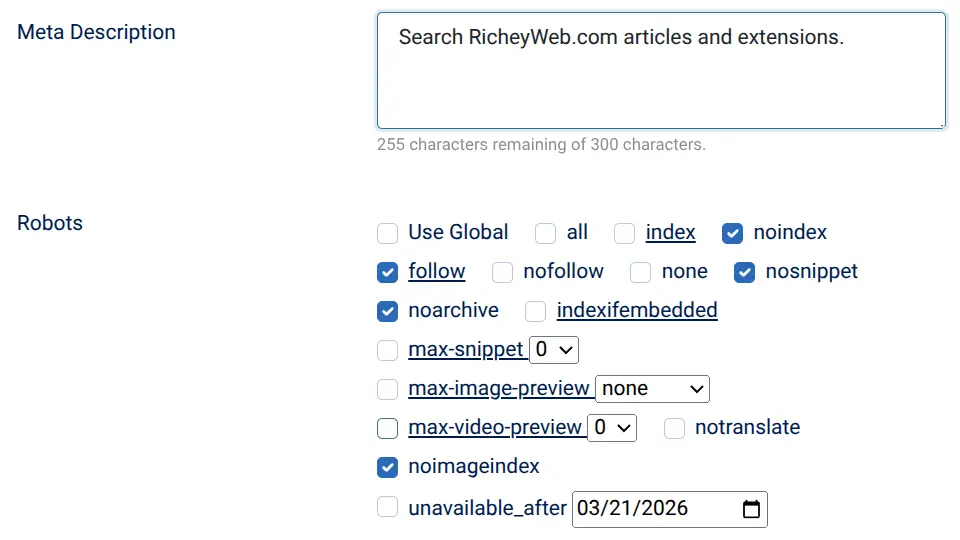
Any web administrator diving into the complexities of SEO will eventually discover one critical misstep can tank your site's visibility and invite serious penalties from search engines: allowing search engine indexing of dynamic search result pages on your Joomla site. These pages, often generated by components like Smart Search or com_search, might seem harmless or even useful at first glance. However, they pose significant risks to your site's health, from wasting crawl budget to exposing your domain to negative SEO attacks. This article serves as a cautionary guide, outlining why indexing these pages is a terrible idea and how to protect your site using tools like the robots exclusion protocol and the noindex tag. Let’s break down the dangers and solutions to keep your Joomla site safe and optimized.
Hidden Perils of Indexing Dynamic Search Result Pages
Dynamic search result pages, often accessible via URLs with parameters like ?searchword= or ?q=, are inherently problematic for search engine indexing. These pages typically offer thin content, consisting of minimal unique text, a search box, and sometimes pagination links. As noted in Spam Policies for Google Web Search, Google frowns upon content that provides little value to users, categorizing such pages as potential doorway pages that can manipulate rankings or mislead visitors. For Joomla sites using com_search or com_finder, this can lead to duplicate content signals, where near-identical pages flood the index, confusing search engines and diluting your site's authority. The risk is clear: allowing these pages to be indexed can trigger algorithmic flags or even manual actions, especially after recent spam updates.
How Crawl Budget Gets Wasted on Low-Value Pages
Every site has a limited crawl budget, which is the amount of time and resources search engines like Googlebot allocate to scanning your pages, as detailed in Crawl Budget Management. When dynamic search result pages are indexed, they consume this precious budget, leaving less for your valuable content like product pages or article listings in category listings. This is especially detrimental for non-enterprise Joomla sites, where traffic drops or deindexing of important pages can occur because search engines prioritize crawling endless variations of ?q= or ?ordering=popular&page=2 URLs. Protect your budget by ensuring bots focus on content that matters, not on repetitive, low-value search results that harm your site's overall performance.
Negative SEO Risks and Spam Association Dangers
One of the gravest threats of indexing search pages is their vulnerability to negative SEO attacks. Attackers can exploit these pages by linking to them from link farms using black-hat keywords, as warned in Google Search Spam Updates. For instance, a malicious link to yourdomain.com/?searchword=viagra could associate your site with penalized keywords, tarnishing your reputation in the eyes of search engines by using a known attack vector. This spam association risk can lead to severe consequences, including algorithmic penalties or manual reviews that result in traffic drops. Joomla sites, with their default openness to indexing, are prime targets for such attacks, especially when compounded by issues like junk query parameters polluting canonical URLs (easily prevented with System - Link Canonical.) Vigilance is key to avoiding these search and canonical attack traps.
Joomla-Specific Challenges with Search Components
Joomla sites face unique challenges due to how components like Smart Search (com_finder) and com_search operate. By default, these generate countless dynamic URLs that are often left open to indexing unless explicitly blocked. Many administrators create a Search menu item that inherits global 'Index, Follow' settings, unintentionally exposing these pages. Additionally, pagination parameters like ?page= or ?limitstart= create further duplicate content issues, amplifying the problem. For multilingual sites, ensuring consistent blocking across language prefixes (e.g., /en/search?) adds another layer of complexity. Recognizing these vulnerabilities is the first step to safeguarding your site from unnecessary risks and ensuring search engines prioritize meaningful content over auto-generated clutter.
Practical Solutions: Blocking Indexing with Robots Exclusion Protocol
To mitigate these dangers, start with the robots exclusion protocol by updating your robots.txt file in the root directory. Add specific rules to block crawling of search-related URLs, such as Disallow: /search?* or Disallow: /*?searchword=*, as suggested in various SEO best practices. This prevents bots from accessing these pages, conserving crawl budget. However, remember that robots.txt alone doesn't remove already-indexed pages; it must be paired with other methods for full protection. Be cautious not to block legitimate pagination used in article listings or category listings (e.g., ?start=), as this could harm visibility of core content. This approach is a solid first line of defense for Joomla administrators learning to manage bot behavior.
Leveraging Noindex Tag and Meta Robots Directives for Control
For more granular control, use the noindex tag via a menu item override in Joomla or through the metadata tab of your search menu item, setting it to 'No index, follow'. This ensures the page isn't indexed while still allowing link crawling. For comprehensive coverage, install the System - Meta Robots plugin, a free tool that targets components like comsearch and comfinder with meta robots directives such as noindex, follow. As outlined in Robots Meta Tags Specifications, you can also use X-Robots-Tag in HTML responses for non-HTML resources if needed. These methods prevent duplicate content issues and protect against spam association risk, offering a robust solution without risking conflicts with Joomla's core settings.
Monitoring and Verification with Google Search Console
After implementing these blocks, verification is crucial. Use Google Search Console to monitor the Page Indexing report for lingering ?searchword= or ?option=com_search URLs. Check the source code of your search pages to confirm the presence of a single <meta name=\"robots\" content=\"noindex...\"> tag or relevant X-Robots-Tag headers. Conduct a site audit by searching site:yourdomain.com ?searchword= on Google to ensure minimal results appear post-crawl. For urgent cases of already-indexed pages tied to negative SEO, utilize the URL removal tool in GSC to expedite deindexing. Regular checks, as advised in Should Internal Site Search Results Pages Be Indexed?, help confirm that your fixes are effective and prevent future index bloat or traffic drops.
Protect Your Joomla Site from Silent SEO Killers
Indexing dynamic search result pages on your Joomla site is a silent but deadly error that can drain your crawl budget, invite negative SEO attacks, and trigger deindexing or penalties due to thin content and duplicate content issues. By understanding the risks associated with components like comsearch and Smart Search, and by applying protective measures such as the robots exclusion protocol, noindex tag, and tools like the System - Meta Robots plugin, you can safeguard your domain. Don’t wait for algorithmic flags or manual actions to strike. Conduct a thorough site audit today, monitor via Google Search Console, and block unnecessary indexing to preserve your rankings and protect against the next wave of spam updates. Your site's future depends on these proactive steps.
Dynamic search result pages on Joomla sites, often generated by components like Smart Search or com_search, typically contain thin content with little unique value, such as search boxes and pagination links. These pages can be seen as doorway pages by search engines like Google, potentially manipulating rankings or misleading users, which violates spam policies and risks penalties or algorithmic flags. Indexing search result pages consumes a significant portion of a site's limited crawl budget, which is the time and resources search engines allocate to scanning pages. This leaves less budget for crawling valuable content like product or article pages, potentially leading to traffic drops or deindexing of important content on Joomla sites. Indexing search pages on Joomla sites increases vulnerability to negative SEO attacks, where attackers link to these pages from link farms using black-hat keywords. This can associate your site with penalized keywords, risking algorithmic penalties or manual actions that cause traffic drops and damage your site's reputation. Joomla search components like Smart Search (com_finder) and com_search generate numerous dynamic URLs that are often indexed by default unless blocked. Issues like pagination parameters and inherited 'Index, Follow' settings in menu items, especially on multilingual sites, create duplicate content and complicate SEO management. The robots exclusion protocol, implemented via the robots.txt file in the root directory, can block search engines from crawling search-related URLs on Joomla sites using rules like 'Disallow: /search?*'. This helps conserve crawl budget by preventing access to low-value pages, though it must be combined with other methods to remove already-indexed pages. The noindex tag can be applied through a menu item override or the metadata tab in Joomla, setting pages to 'No index, follow' to prevent indexing while allowing link crawling. Additionally, using the System - Meta Robots plugin can target components like com_search with meta robots directives for effective control. Monitoring with Google Search Console is crucial to verify that blocks on search page indexing are effective. It helps check for lingering indexed URLs in the Page Indexing report, confirms the presence of noindex tags or X-Robots-Tag headers, and allows use of the URL removal tool for urgent deindexing related to negative SEO issues.Frequently Asked Questions:
Why are dynamic search result pages on Joomla sites problematic for SEO?
How does indexing search result pages affect crawl budget on Joomla sites?
What are the negative SEO risks associated with indexing search pages on Joomla?
What specific challenges do Joomla search components pose for indexing?
How can the robots exclusion protocol help prevent indexing of search pages on Joomla?
How can the noindex tag be used to control indexing on Joomla sites?
Why is monitoring with Google Search Console important after blocking search page indexing?
