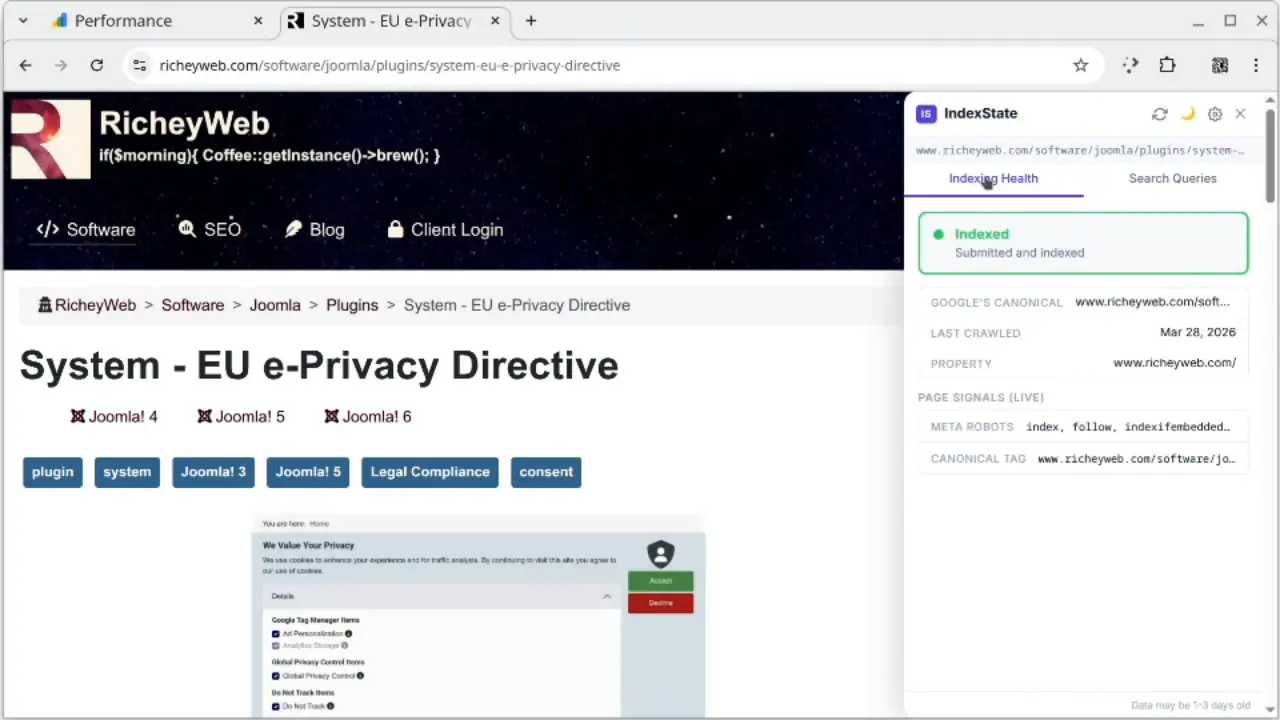
You're auditing a page. You want to know if Google has indexed it. So you open a new tab, navigate to Search Console, paste the URL, and wait. Then you do it again for the next page. And the next.
IndexState puts that answer on the page you're already on. Click once, and your indexing status and top search queries appear in a sidebar — no tab switching, no URL copying, no losing your place in what you were doing.
See it in action
Local Video
YouTube
It does two things, and it does them well
Is this page indexed?
IndexState shows you Google's exact verdict — Indexed, Crawled but not indexed, Blocked — along with the specific reason, when Google last crawled the page, and whether Google is using a different canonical URL than the one you declared. That last one catches more problems than you'd expect.
What are people searching to find this page?
The Search Queries tab shows the top queries driving impressions and clicks to the current URL — with impressions, clicks, click-through rate, and average position. Switch between the last 7, 28, or 90 days. Pages with high impressions and low click-through rates are flagged automatically, because those are the pages where a better title or meta description could actually move the needle.
Your data stays yours
IndexState has no backend server. Nothing you do with it is collected, stored, or shared with anyone. The extension talks directly to Google's APIs using your own Google account — the same account you already use for Search Console — and everything stays in your browser.
Setup takes about five minutes. A built-in wizard walks you through creating a free Google Cloud credential, connecting your account, and choosing which of your verified properties to activate it on. Once connected, IndexState appears silently on pages that belong to your verified properties and nowhere else.
What you get
The answer without the tab switch — Indexing status appears on the page you're on, the moment you need it, without interrupting what you're doing.
Canonical mismatch alerts — Know immediately when Google has chosen a different canonical than the one you set. This is one of the more common indexing issues and one of the harder ones to catch.
Search queries for this exact URL — Not your site overall. This page, these queries, right now.
Optimization flags — High impressions, low click-through rate. The pages where small copy changes can have real impact, surfaced automatically.
Zero footprint — The badge appears only on your verified properties. Every other site on the internet, IndexState is completely invisible.
Your choice of corner — The badge sits in whichever corner of the screen you prefer. The sidebar slides in from the same side.
Light and dark mode — Because you're going to have this open a lot.
The wizard generates your redirect URI for you and shows you exactly where to paste it. The whole process is four steps with instructions for each one. Most people are connected in under ten minutes including the Google Cloud setup. IndexState injects a small badge and a hidden iframe into pages on your verified properties. The sidebar only loads when you open it. There is no impact on page performance for your visitors — the extension is invisible to them entirely. Google allows 2,000 URL inspections per day per property. IndexState caches results for three hours, so revisiting the same page doesn't burn quota. For normal use — checking dozens of pages a day — you'll use a small fraction of the limit. Yes. Free to install, free to use, no subscription, no account beyond the Google account you already have.Frequently Asked Questions:
Is setup really that simple?
Will it slow my site down?
What about API limits?
Is it really free?
Get IndexState
Install IndexState from the Chrome Web Store
Free. No account required beyond your existing Google account. Works on any site you have verified in Google Search Console.
