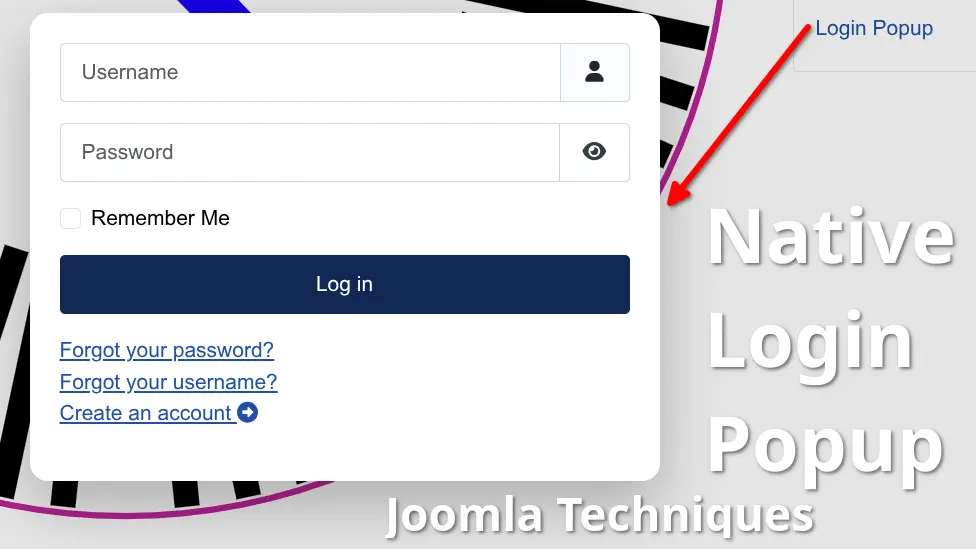
A login popup for Joomla - one that lets visitors sign in on the page they're already on, matches your site's branding, and closes the way users expect - sounds like a premium extension. It isn't. Joomla's core already provides every component needed to build a native login popup: a login module, an AJAX template helper, and the browser's own <dialog> element. Your existing module configuration controls the behavior - including where users land after login - exactly as you've set it up. No subscription, no third-party code, no additional attack surface. Just Joomla, doing what Joomla already knows how to do.
This tutorial builds it from scratch - lightweight, maintainable, and fully compatible with Joomla 4, 5, and 6.
In this guide, we’ll build a lightweight native login popup that:
- Uses your existing mod_login module exactly as you configured it (any redirects, greeting settings, or post-login behavior will continue to work normally)
- Offers a perfect no-JavaScript fallback (a full login page)
- Remains extremely small, clean, and maintainable
This is the Joomla way: leverage the platform’s built-in tools instead of adding unnecessary layers.
Step 1: Create the Menu Item
Create a new menu item of type System Links > URL.
Set the Link field to:
index.php?option=com_ajax&template=YourTemplateName&method=loginForm&format=htmlReplace YourTemplateName with the actual folder name of your active template (for example: cassiopeia or the name of your child template).
In the Link Type tab, add the CSS class dialog-login in the Link CSS Style field.
This ensures that visitors without JavaScript receive a fully functional login page, while those with JavaScript get the popup experience.
Step 2: Create the Template Helper (helper.php)
In the root of your template folder (strongly recommended: use a child template), create or update the file helper.php:
<?php
defined('_JEXEC') or die;

use Joomla\CMS\Factory;
use Joomla\CMS\Helper\ModuleHelper;
use Joomla\CMS\Language\Text;
use Joomla\CMS\HTML\HTMLHelper;
use Joomla\Registry\Registry;

class TplCassiopeiaHelper   // Change "Cassiopeia" to match your actual template folder name
{
    public static function loginFormAjax()
    {
        $app = Factory::getApplication();
        $input = $app->getInput();

        $moduleId = $input->getInt('moduleid', 0);

        $module = ModuleHelper::getModule('mod_login');

        if (empty($module->id) && $moduleId) {
            $module = ModuleHelper::getModuleById($moduleId);
        }

        if (empty($module)) {
            return '<div class="alert alert-danger">' . Text::_('MOD_LOGIN_MODULE_NOT_FOUND') . '</div>';
        }

        // Optional tweaks for better popup presentation while respecting your module settings

        // if you want to redirect to a specific menu item
        $params = new Registry($module->params ?? '{}');
        $params->set('show_login_form', 1);
        $params->set('greeting', 0);   // Change to 1 if you prefer greeting when logged in
        $params->set('login', numeric-menu-id-here);
        $module->params = $params->__toString();

        $html = ModuleHelper::renderModule($module, $attribs);

        // if you want to stay on the current page
        $referrer = $input->server->get('HTTP_REFERER', '', 'string');
        if($referrer) {
          $base64Referrer = base64_encode($referrer);
          $find = '/name="return" value="[^"]*"/i';
          $replace = 'name="return" value="'.$base64Referrer.'"';
          $html = preg_replace($find, $replace, $html);
        }

        $attribs = ['style' => 'none'];

        // Handle potential session token timeout (especially useful on cached pages)
        $timeout = $app->get('lifetime', 15) * 60 * 1000; // in milliseconds
        $timeoutTag = '<script type="application/json" id="loginTokenTimeout">' . json_encode(['timeout' => $timeout]) . '</script>';

        return '<div class="joomla-native-login-popup">' . $html . $timeoutTag . '</div>';
    }
}Step 3: Add the JavaScript
Most modern Joomla templates support a user.js file that loads automatically. Add the following to your template’s user.js (or include it via your template’s script loader):
var initLoginDialog = function() {
    document.addEventListener('click', function (e) {
        const link = e.target.closest('a.dialog-login');
        if (!link) return;

        e.preventDefault();

        let ajaxUrl = link.href.replace(/format=html/i, 'format=raw');
        if (ajaxUrl === link.href) {
            ajaxUrl += (ajaxUrl.includes('?') ? '&' : '?') + 'format=raw';
        }

        let dialog = document.getElementById('joomlaLoginDialog');
        if (!dialog) {
            dialog = document.createElement('dialog');
            dialog.id = 'joomlaLoginDialog';
            dialog.setAttribute('closedby', 'any');
            dialog.style.cssText = `
                width: 420px;
                max-width: 95vw;
                border: none;
                border-radius: 12px;
                padding: 0;
                box-shadow: 0 15px 40px rgba(0, 0, 0, 0.25);
                background: white;
            `;
            document.body.appendChild(dialog);
        }

        dialog.innerHTML = `
            <div style="padding: 40px 20px; text-align: center; font-family: system-ui, sans-serif;">
                <div style="margin-bottom: 16px; color: #666;">Loading login form...</div>
                <div style="width: 36px; height: 36px; border: 5px solid #f0f0f0; border-top: 5px solid #0d6efd;
                            border-radius: 50%; animation: spin 0.9s linear infinite; margin: 0 auto;"></div>
            </div>
            <style>@keyframes spin { to { transform: rotate(360deg); } }</style>
        `;

        dialog.showModal();

        fetch(ajaxUrl)
            .then(response => {
                if (!response.ok) throw new Error('Failed to load');
                return response.text();
            })
            .then(html => {
                dialog.innerHTML = `
                    <div style="position: relative; padding: 20px;">
                        <button onclick="this.closest('dialog').close()"
                                style="position: absolute; top: 12px; right: 16px; font-size: 28px;
                                    background: none; border: none; cursor: pointer; color: #999; line-height: 1;">
                            ×
                        </button>
                        <div class="joomla-native-login-popup">${html}</div>
                    </div>
                `;

                // Auto-close dialog if login token expires (helpful for cached pages)
                const timeoutScript = dialog.querySelector('#loginTokenTimeout');
                if (timeoutScript) {
                    try {
                        const data = JSON.parse(timeoutScript.textContent);
                        if (data.timeout) {
                            setTimeout(() => {
                                dialog.close();
                                alert('Your login session has expired. Please try logging in again.');
                            }, data.timeout);
                        }
                    } catch (err) {
                        console.log('Failed to parse login token timeout:', err);
                    }
                }
            })
            .catch(() => {
                dialog.innerHTML = `
                    <div style="padding: 40px 20px; text-align: center; color: #c00;">
                        Could not load the login form.<br><br>
                        <button onclick="this.closest('dialog').close()">Close</button>
                    </div>
                `;
            });
    });
};

window.addEventListener('DOMContentLoaded', initLoginDialog);
Login Popup Final Touches
Add some custom CSS targeting .joomla-native-login-popup to fine-tune spacing, button styles, and overall appearance so the form blends seamlessly with your site.
Logout needs to be handled separately. The login link will display the logout button, but will redirect you to a raw version of the login module - so your best bet is to set the login menu item to only display for guest access levels, then create a separate logout button only displayed for registered access levels.
Official Documentation
For more details on using com_ajax with templates, refer to the official Joomla manual:
Using com_ajax for Modules, Plugins and Templates: https://manual.joomla.org/docs/4.4/general-concepts/javascript/com-ajax/
This page explains the template helper pattern, URL structure, and naming conventions we used here.
HTML dialog element (MDN Web Docs): https://developer.mozilla.org/en-US/docs/Web/HTML/Reference/Elements/dialog
These two resources cover the key native technologies used in this technique.
Why This Approach Wins
This solution is deliberately minimal - just one small helper file and a few lines of vanilla JavaScript. It delivers a modern popup experience while fully respecting Joomla’s core login system and your existing module configuration.
Joomla doesn’t need extra extensions for everyday modern features. It just needs us to explore its tools and share clean, reusable techniques with the community.
Login Popup Demo? Absolutely!
Joomla Native Login Popup Demo
Yes. The popup loads your existing mod_login module exactly as configured — including post-login redirects, greeting settings, and any other parameters you've set. Nothing is overridden except presentation. The menu item links directly to a fully functional login page. Visitors without JavaScript get a normal login experience — no broken UI, no dead links. The popup is a progressive enhancement, not a dependency. com_ajax is a Joomla core component that provides a standardized way to make AJAX requests to modules, plugins, and templates without building a custom component. It's used here to load the login form into the popup without a full page reload. The native element is built into modern browsers and handles accessibility, focus trapping, keyboard dismissal, and backdrop rendering automatically — without a single line of library code. It's the right tool for this job in 2025 and beyond. Strongly recommended but not strictly required. Using a child template ensures that your helper.php file survives Joomla template updates without being overwritten. Modifying a parent template directly risks losing your changes on the next update. If your social login extension integrates with mod_login and renders inside the standard module output, it will appear in the popup. Extensions that redirect to external OAuth flows will follow their normal behavior after the popup opens. Yes. The login form is rendered by Joomla's own mod_login module and submitted through Joomla's standard authentication system. The CSRF token, session handling, and all security mechanisms remain fully intact. No authentication logic is reimplemented. closedby="any" is a recent addition to the HTML specification and is supported in modern browsers. In browsers that don't yet support it, the dialog still closes via the × button or the Escape key — the click-outside behavior degrades gracefully. Yes. The popup wrapper carries the class joomla-native-login-popup and the dialog element can be targeted directly in your template's user.css. All inline styles in the JavaScript are intentional defaults — they're fully overridable with standard CSS specificity. The session token timeout handler addresses the most common caching issue — if the page has been cached and the login token has expired, the popup will alert the user rather than silently failing. For heavily cached sites, ensure mod_login is excluded from page caching.Frequently Asked Questions:
Does this work with Joomla's existing login module settings?
What happens if JavaScript is disabled?
What is com_ajax and why is it used here?
Why use the HTML dialog element instead of a custom modal?
Does this require a child template?
Will this work with third-party login plugins like social login extensions?
Is this approach secure?
Does the closedby="any" attribute work in all browsers?
Can I style the popup to match my template?
Does this work on cached pages?
