
If you've ever tried to add custom scripts or stylesheets to a single article in Joomla, you know the frustration. You spend time crafting the perfect JavaScript or CSS, only to have it stripped out the moment you hit save. It's a common pain point for many in website development, especially when working within a content management system like Joomla. In fact, this issue is one of the most frequently asked questions among users.
Just search the forums and you'll find threads like Joomla - Insert .js and .css files into a single Joomla article?, Joomla 3 can't add <script> to article, How do you assign jQuery scripts to an article?, and Add page-specific javascript or CSS in Joomla popping up year after year. Don't worry, though. This guide will walk you through why this happens, core workarounds for Joomla, popular community solutions, and some easy buttons from RicheyWeb to simplify your web development process.
Why Joomla Strips Your Scripts and Styles
Joomla, as a robust content management system, prioritizes security. One of its protective measures is to prevent potential threats like cross-site scripting (XSS) attacks. This Joomla security feature often results in editor filtering that removes or alters custom scripts and stylesheets when you save an article. While this is great for CMS security, it can be a real headache for website administration when you're trying to add specific JavaScript or CSS to enhance user experience on a single page.
Understanding Joomla Security and Editor Filtering
Joomla's WYSIWYG editor (like TinyMCE or JCE) and content filters are designed for security. Allowing raw <script> tags in articles opens the door to XSS attacks, especially on sites with multiple authors.
- Even if you switch to "No Editor" or adjust Global Configuration > Text Filters (e.g., set Super Users to "No Filtering"), code can still get mangled or cause issues.
- Global solutions (like adding to your template's index.php) load assets on every page—bloating load times and wasting resources.
- The result: You end up with clunky hacks that feel unreliable.
But don't worry—Joomla provides built-in ways to handle this safely.
The Impact on Website Development
When you're deep into website development, especially with Joomla, the inability to easily add custom scripts or stylesheets can slow down your workflow. Whether it's a unique jQuery effect or a tailored CSS design, losing your code on save disrupts both frontend and backend development. It's a barrier to achieving the desired user experience for your audience.
Core Joomla Workarounds
Basic: Disable Filtering or Use a Code-Friendly Editor
- Switch the article to "Editor - None" or use CodeMirror.
- In Global Configuration > Text Filters, relax rules for trusted user groups (or tweak TinyMCE's Prohibited Elements).
Pros: Quick and simple for inline styles/scripts.
Cons: Risky on multi-author sites; still limited for external files or proper <head> loading.
Intermediate: Custom HTML Module + Load Position
- Create a Custom HTML module with your script/style code (or inline).
- Assign it to the specific article/menu item.
- Load it in the article with or {loadmoduleid XX} (hidden with CSS if needed).
Pros: Per-page control; works well for inline content.
Cons: Assets might not load in <head>; manual every time.
Advanced: Custom HTML Module Layout Override with WebAssetManager (Joomla 4/5/6)
This is the pro-level pure-Joomla solution for clean, proper asset loading.
- Create a Custom HTML module (blank content, assigned to your article).
- In your template folder: /templates/your-template/html/mod_custom/my-assets.php
- Use PHP to register assets via Joomla's WebAssetManager (supports defer/async, no duplicates).
- Set the module's Layout to your override file.
- Load the module in the article (hidden output).
Pros: Assets load correctly in <head>, performant, secure, only where the module is published.
Cons: Requires PHP knowledge and template access.
Challenges with Core Methods in Joomla
While these core methods work, they often demand technical know-how or manual effort. Disabling filters can expose you to security risks like cross-site scripting, while modules and overrides might feel cumbersome for quick tasks in website administration. This is where third-party extensions come into play for many Joomla users.
Popular Community Solutions: Third-Party Extensions
The Joomla community has created several reliable tools to simplify this. Here are a few widely recommended ones:
- Sourcerer by Regular Labs: A free (with Pro version) plugin that lets you wrap code in {source} tags to insert PHP, JS, CSS, or HTML directly—without stripping. Perfect for quick per-article injections and highly popular for bypassing editor limits.
- Custom Head Tag and CSS and Javascript by JoomHelper: Allows adding custom JS/CSS/meta tags per article via dedicated fields—great for targeted, no-code additions with support for structured data and more.
These extensions are trusted and highly rated on the Joomla Extensions Directory, but they may require site-wide enabling or tag memorization.
The Easy Buttons: RicheyWeb Extensions for Effortless Per-Article Assets
These core and community methods work well—but often feel manual or code-heavy for everyday editors. That's why I created free RicheyWeb extensions focused on secure, user-friendly per-article injection.
Fields - XMLForm: The Ultimate Visual Easy Button
Fields - XMLForm turns Joomla's custom fields into intuitive forms for loading scripts/stylesheets—only on the articles where needed.
Download the free plugin from richeyweb.com, install, and import my ready-to-use definitions (no coding required).
Standout Example: Bootstrap 5 Components Per-Article Import the free jbootstrap package from richeyweb.com.
In the article editor, editors get a simple checkbox interface:
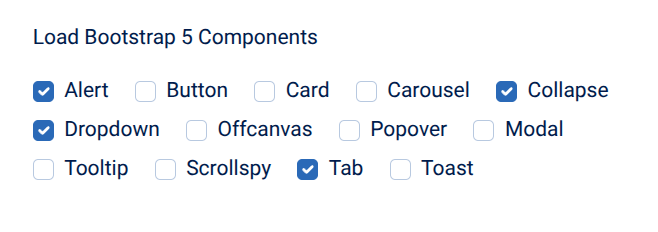
(Just check what you need—e.g., Alert, Collapse, Dropdown, Modal, Tab—and the required Bootstrap 5 JS/CSS loads only on this article. No extra files if nothing's selected!)
Other free definitions:
- Script: External or inline JavaScript (defer/async options).
- StyleSheet: Custom CSS files or inline styles per article.
Why it's ideal: Checkboxes/forms for editors; proper WebAssetManager loading; performance-optimized.
System - Head Tag: The Quick Tag-Based Solution
Drop simple tags in your article (editor-safe).
System - Google Tag Manager: The Pro Scalable Option
Install GTM once, then trigger custom JS/CSS per-article via Google's interface (great for consent-aware or dynamic scripts).
Wrap-Up: Solve This Headache Forever
From basic filtering tweaks to advanced overrides, Joomla offers solid core options—and community favorites like Sourcerer fill the gaps quickly. But for the easiest, most editor-friendly experience, try Fields - XMLForm with its ready-made definitions.
Conclusion: Simplifying Joomla Customization
Adding custom scripts or stylesheets to a single Joomla article doesn't have to be a headache. From understanding why Joomla strips code due to editor filtering and Joomla security, to exploring core workarounds like custom HTML modules and WebAssetManager overrides, there's a path for everyone. Community solutions like Sourcerer and Add Custom CSS offer accessible third-party extensions, while RicheyWeb's easy buttons, especially Fields - XMLForm, provide tailored simplicity for web development. Start with Fields - XMLForm for its versatility and ease, and let us know your thoughts or experiences in the comments. If you've found value in these tools, consider leaving a review on the Joomla Extensions Directory to support the community!
Joomla prioritizes security to prevent threats like cross-site scripting attacks. By default, editors like TinyMCE are set to filter out certain HTML elements, including script tags, to protect against malicious code. This editor filtering ensures CMS security but can remove your custom JavaScript and CSS when saving content.
You can disable editor filtering by going to Joomla's Global Configuration, selecting the Text Filters tab, and setting filtering for Super Users to 'No Filtering.' This allows HTML, JavaScript, and CSS to remain in your articles, but it poses a security risk if not handled with caution. A safer method is using a custom HTML module with the loadposition plugin. Create a module with your scripts or stylesheets, assign it to a specific position, and insert it into your article using the {loadposition} tag. This keeps your code isolated and secure, limiting its scope to the intended page. For advanced users, WebAssetManager allows you to create custom overrides to inject scripts or styles into specific pages. This method requires technical knowledge of Joomla's backend but provides precise control over asset loading, aligning with best practices for customization. Two popular extensions are Sourcerer by Regular Labs and Add Custom CSS by Impression eStudio. Sourcerer lets you place HTML, JavaScript, or CSS directly in content using {source} tags, while Add Custom CSS loads custom styles after other CSS files to override designs easily.
Fields - XMLForm is a free RicheyWeb plugin that allows you to create complex forms using Joomla's XML syntax and output them as HTML, meta tags, or scripts in the head section. It offers a visual editor for ease, making it ideal for embedding custom JavaScript or Bootstrap components in specific articles.
System - HeadTag, another free RicheyWeb plugin, enables you to inject JavaScript, CSS, or custom tags into the document head based on menu items or user groups. It's perfect for page-specific customizations, supporting frameworks like jQuery and Bootstrap, ensuring scripts load only where needed.
Yes, custom scripts can enhance SEO. For example, Fields - XMLForm allows you to add structured data like JSON-LD directly into articles for better search visibility. Additionally, System - Google Tag Manager helps with analytics tracking, supporting SEO efforts with data-driven insights.
To maintain website performance, load scripts and styles only on pages where they are needed. Tools like System - HeadTag and Fields - XMLForm allow targeted loading, preventing unnecessary bloat on other pages and keeping load times optimal for a better user experience. Balancing security with customization is crucial. While adding custom scripts, be aware of risks like cross-site scripting. Use trusted plugins like those from RicheyWeb, and avoid disabling editor filters unless necessary. Always follow Joomla security best practices to protect your site.
Frequently Asked Questions:
Why does Joomla strip out my custom scripts and stylesheets when I save an article?
How can I disable editor filtering in Joomla to add custom scripts?
What is a safe way to add custom scripts to a single Joomla article without disabling filters?
How can I use Joomla's WebAssetManager for adding custom scripts or styles?
What are some popular third-party extensions for adding custom code in Joomla?
How does Fields - XMLForm help with custom scripts in Joomla articles?
What is System - HeadTag and how does it assist with page-specific customizations?
Can I use custom scripts to improve SEO on my Joomla site?
How do I ensure website performance when adding custom scripts in Joomla?
What should I consider about security when adding custom code to Joomla?
