Joomla's editor strips iframe, script, and style tags. It's a security measure, and it's intentional - but it leaves a lot of legitimate use cases stranded. If you've ever pasted an embed code into an article only to find it gone on save, you know exactly what this means.
The frustrating part is that the workarounds are already built into Joomla. You don't need a paid plugin to insert an iframe, inject a script, or reuse content blocks across your site. You just need to know where to look.
Here's every legitimate way around the restriction - using tools you either already have or can get free.
Iframes
Joomla ships with a dedicated iframe module called mod_wrapper. Fill in the URL, set your dimensions, and you're done. No HTML required, no editor configuration, no stripped tags - because you never put the iframe in the editor in the first place.
Once configured, insert it into any article with {loadmoduleid X}. Or use Content - Included to inject it automatically across entire categories without touching a single article.
Scripts and Styles in the Page Head
Inline scripts and stylesheets don't belong in article content anyway - they belong in the <head>. System - Head Tag puts them there properly, using Joomla's own document API.
This matters more than it might seem. Scripts stuffed into article bodies are at the mercy of the editor, page caching, and component rendering - any of which can silently break them. System - Head Tag inserts at the right point in the page lifecycle, so your scripts load reliably every time.
For per-article or per-category scripts, combine it with Joomla's module assignment system to control exactly where and when they fire.
Arbitrary HTML - Embeds, Custom Code, Anything Else
For everything else - embed codes, custom markup, third-party widgets - Joomla's Custom HTML module (mod_custom) accepts almost any HTML you give it. The trick is that the module lives outside the editor, so the editor's tag-stripping rules don't apply. Enable "Prepare Content" in the module options and you also get full {loadmoduleid} and {loadposition} support, meaning you can nest other modules inside it if needed.
Assign it to your articles manually, or use Content - Included to inject it automatically by category, subcategory, or article tag.
When You Need More Control Over Module Output
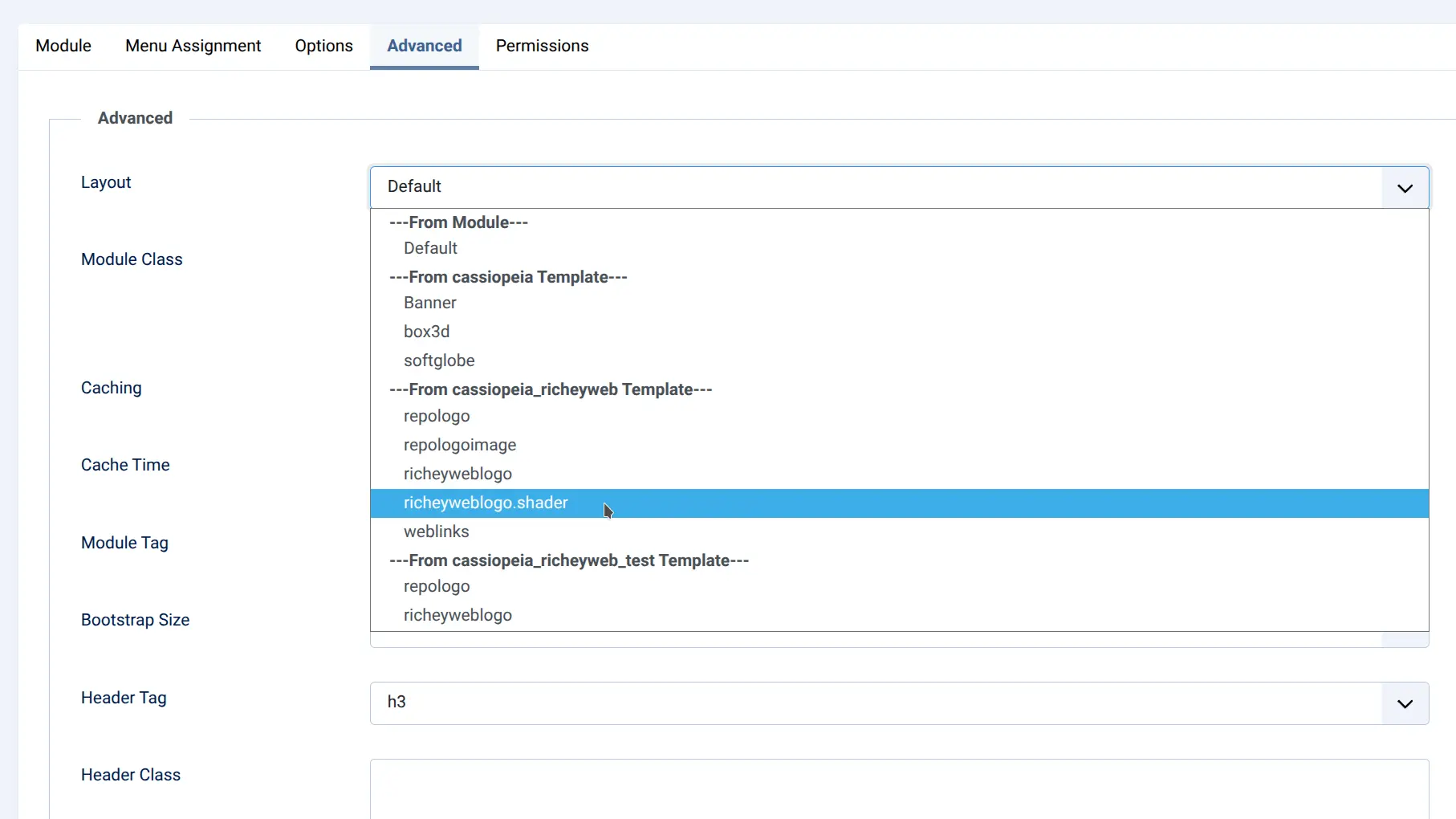
If you need to wrap module output in custom markup - suppress the module chrome, adjust the HTML structure, or control exactly what renders - a mod_custom template override handles that without any additional plugins. Create an override under your template's html/mod_custom/ folder and you have full control over the rendered HTML.
Just create a php file in /path/to/your/joomla/template/html/mod_custom/ and Joomla will offer it to you as a layout option in the module Advanced tab.
Reusable Content Blocks
If you want a block of content - a disclaimer, a promotional message, a signature - to appear consistently across multiple articles, the answer is a Custom HTML module combined with Joomla's native {loadmoduleid} tag.
Create the module once. Insert {loadmoduleid X} wherever you want it to appear. Update the module and every instance on your site updates with it.
For automatic injection across entire categories without touching the articles at all, Content - Included handles this through rules - select the categories, set the insertion point, choose the module. Done.
Headings and Formatted Content
Worth mentioning while we're here: Joomla's editor handles H1 through H6 natively through the toolbar. If you prefer to write markup directly, switching to source view lets you type standard HTML - <h1>, <h2>, whatever you need. No plugin required, no shortcode syntax to remember.
The Full Toolkit
| Need | Solution |
|---|---|
| Iframes | mod_wrapper |
| Scripts and styles in the page head | System - Head Tag |
| Embed codes and arbitrary HTML | Custom HTML module |
| Reusable content blocks | Custom HTML module + {loadmoduleid} |
| Automatic injection into articles by category | Content - Included |
| Custom module output structure | mod_custom template override |
| Headings and formatted content | Joomla editor toolbar or source HTML |
Every solution in this list either ships with Joomla or is available free. More importantly, each one works with Joomla's own rendering pipeline - not around it.
A Note on How These Tools Work
The plugins mentioned here - System - Head Tag and Content - Included - are both free and both built on the same principle: use the APIs Joomla provides, don't work around them. System - Head Tag uses Joomla's document object to inject into the head at the right moment. Content - Included uses the standard content event system and Joomla's own module renderer.
The result is predictable, cache-friendly behavior that plays nicely with whatever else is running on your site.
Joomla's default editor (TinyMCE) filters out tags it considers potentially unsafe, including iframe, script, and style. This is intentional behavior designed to prevent malicious content from being saved into articles. The solution is not to fight the editor — it's to keep those elements out of the editor entirely, using modules designed for the purpose. Use mod_wrapper — Joomla's built-in iframe module. Go to System → Site Modules → New, select Wrapper, enter your URL, set dimensions, and save. Then place {loadmoduleid X} in your article where you want it to appear. You generally shouldn't — scripts and styles belong in the head, not inside article content. System - Head Tag handles this correctly. For cases where you need inline script output as part of module content, use the Custom HTML module with "Prepare Content" enabled, which processes output outside the editor's restrictions. Joomla's native Content - Load Modules plugin handles this. Once enabled, you can use any of three syntaxes in your article text:
{loadmoduleid X} — loads a specific module by its ID
— loads all modules assigned to a named position
— loads a module by type name
Note that the Content - Load Modules plugin must be enabled, and the module must be assigned to the relevant menu items or All Pages. Yes. Create a Custom HTML module with your content, then insert {loadmoduleid X} in any article where you want it to appear. Edit the module once and every article updates automatically. For injecting the same block automatically into entire categories without editing individual articles at all, Content - Included handles that through rules. No. Everything described in this article is either built into Joomla or available free. The editor's tag restrictions exist for security reasons, but Joomla's module system provides clean, supported ways to insert any content — iframes, scripts, custom HTML, reusable blocks — without touching the editor at all. Create a Custom HTML module containing your AdSense code. Because the module lives outside the editor, the tag restrictions don't apply. Then use Content - Included to automatically inject that module after the second paragraph of every article in your chosen categories — no manual editing of individual articles required.Frequently Asked Questions:
Why does Joomla remove my iframe when I save?
How do I embed a YouTube video or external page in a Joomla article?
How do I add a script tag or custom CSS to a Joomla article?
How do I insert a module into a Joomla article?
Can I reuse the same content block across multiple articles without copy-pasting?
Do I need a paid plugin to insert HTML into Joomla articles?
How do I insert Google AdSense or other ad code into my articles?
