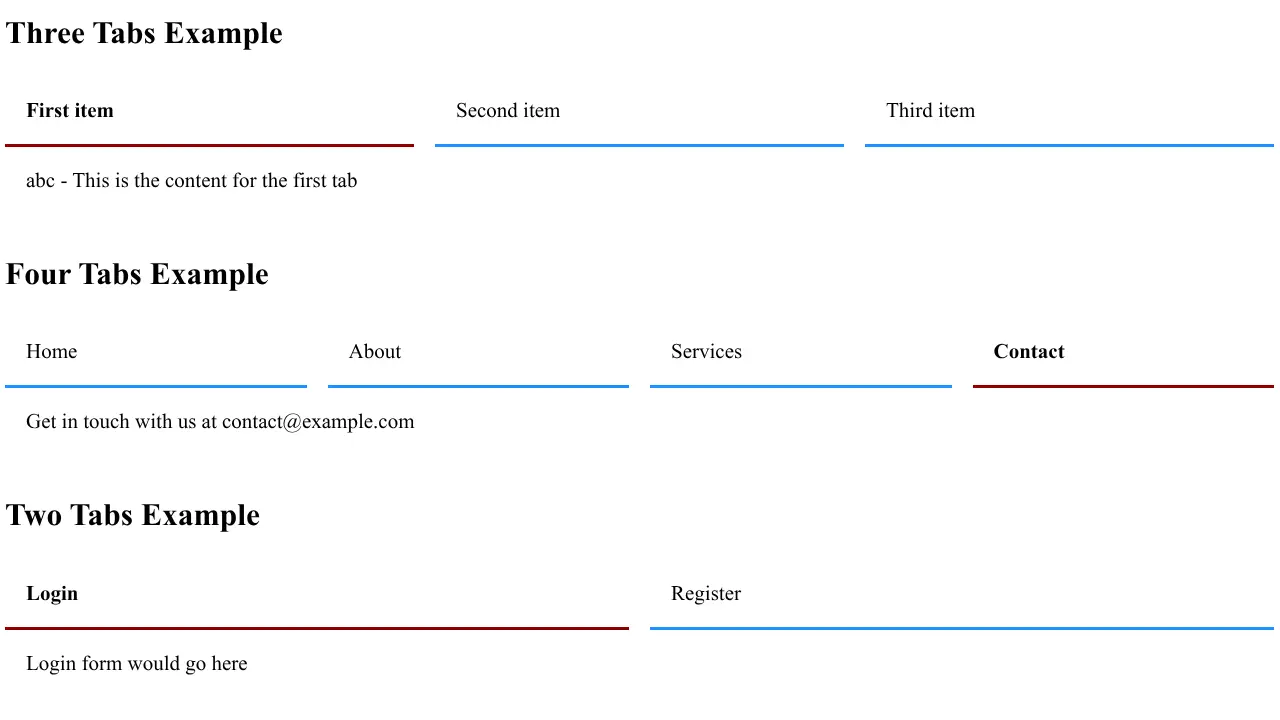
We love Bootstrap, but its tab implementation has been hurting SEO for years. Here's a modern, pure-CSS solution that search engines actually understand. What we needed was SEO friendly tabs, so we made some.
At RicheyWeb Development, we've been loyal Bootstrap users for years. Its grid system revolutionized responsive design, its components accelerated our development workflow, and its documentation made onboarding new developers a breeze. But there's one Bootstrap component we've gradually fallen out of love with: tabs.
The Bootstrap SEO Tab Problem
Bootstrap's tab component is elegant, functional, and widely used. Unfortunately, it's also been a persistent thorn in the side of SEO professionals. The core issue lies in how Bootstrap implements tab functionality: through JavaScript-driven content toggling that relies on dynamic DOM manipulation.
When Bootstrap tabs switch between content panels, they're not simply hiding and showing existing HTML elements. Depending on the implementation, the content may be dynamically loaded, rendered only when activated, or hidden in ways that search engine crawlers struggle to properly index and weight.
What Google Says vs. What Actually Happens
Google's official stance has evolved over the years. In a 2015 statement on Stack Overflow, Google's Gary Illyes clarified that Google "won't see the content behind tabs iff the content under the tab is dynamically generated (i.e. not just hidden)." This is precisely how many Bootstrap tab implementations work.
While Google has since stated that content hidden behind tabs is indexed when it exists in the HTML, real-world testing tells a different story. SEO professionals consistently find that pages with visible content outrank pages where the same content is hidden behind tabs or accordions.
The Reality Check: Multiple industry studies have shown that removing tab-hidden content and making it visible by default resulted in immediate ranking improvements. Even Google-indexed content receives less weight when hidden behind JavaScript-dependent UI elements.
The AI Crawler Problem
Beyond traditional search engines, there's a new challenge: AI crawlers powering large language models. As recent research indicates, LLMs like GPT-4 and DeepSeek cannot access content rendered by JavaScript. If you're prioritizing visibility in AI-powered search results and citations (the emerging field of "generative engine optimization"), content hidden in Bootstrap tabs is essentially invisible.
Enter Pure CSS Tabs with <details>
The solution comes from an elegant CSS Tricks article: Pure CSS Tabs with <details>, Grid and Subgrid. This approach leverages native HTML elements and modern CSS features to create a tab interface that's both beautiful and SEO-friendly.
A Small Example
Tab 1 Title
Tab 1 Content
Tab 2 Title
Tab 2 Content
Tab 3 Title
Tab 3 Content
How It Works
The implementation uses the HTML <details> element, which provides native accordion functionality. When multiple <details> elements share the same name attribute, they become mutually exclusive—opening one automatically closes the others. Combined with CSS Grid and the new ::details-content pseudo-element (baseline 2025), we can create a tab interface that requires zero JavaScript.
Here's the basic HTML structure:
<div class="detail-tabs">
    <details name="alpha" open>
        <summary>Tab 1 Title</summary>
        <div>Tab 1 Content</div>
    </details>
    <details name="alpha">
        <summary>Tab 2 Title</summary>
        <div>Tab 2 Content</div>
    </details>
    <details name="alpha">
        <summary>Tab 3 Title</summary>
        <div>Tab 3 Content</div>
    </details>
</div>
And the core CSS:
.detail-tabs {
  display: grid;
  grid-template-columns: repeat(3, minmax(calc(33.33% - 2rem), 1fr));
  grid-template-rows: auto 1fr;
  column-gap: 1rem;
}

.detail-tabs details {
  display: grid;
  grid-template-columns: subgrid;
  grid-template-rows: subgrid;
  grid-column: 1/-1;
  grid-row: 1/span 3;
}

.detail-tabs > details[open] > div {
  position: relative;
  z-index: auto;
}

.detail-tabs details::details-content {
  grid-row: 2;
  grid-column: 1 / -1;
  padding: 1rem;
}

.detail-tabs details:not([open])::details-content {
  display: none;
}

.detail-tabs details[open] summary {
  font-weight: bold;
}

.detail-tabs summary {
  z-index: 1;
  grid-row: 1;
  grid-column: var(--n) / span 1;
  display: grid;
  padding: 1rem;
  border-bottom: 2px solid var(--tab-color, dodgerblue);
  cursor: pointer;
}

.detail-tabs[open] summary {
  border-bottom: 2px solid var(--tab-open-color, darkred);
}
The SEO Advantages
This approach delivers three critical SEO benefits that Bootstrap tabs simply cannot match:
-
All content is in the DOM from the start. Search engines can crawl and index every tab's content in a single page load, without executing JavaScript or simulating user interactions.
-
Semantic HTML structure. The
<details>and<summary>elements clearly communicate content hierarchy to search engines, providing valuable context about what's a heading versus body content. -
No JavaScript dependency for crawlers. Even search engines with limited JavaScript support can fully access and understand the content, ensuring maximum visibility.
Future-Proof Indexing: This approach ensures visibility not just in traditional search engines, but also in AI-powered tools and LLM citations—a growing factor in modern SEO strategy.
Making It Flexible with JavaScript
The pure CSS implementation works beautifully, but it has one limitation: the grid columns are hardcoded for a specific number of tabs. To make this truly reusable, we developed a small JavaScript class that automatically detects tab groups and applies the correct CSS variables.
class DetailTabs {
  constructor(options = {}) {
    this.gapSize = options.gapSize || 1; // rem
    this.requireOpen = options.requireOpen !== false;
    this.init();
  }

  init() {
    const namedDetails = document.querySelectorAll('.detail-tabs details[name]');
    const groups = this.groupByName(namedDetails);

    Object.entries(groups).forEach(([name, details]) => {
      this.processGroup(name, details);
      if (this.requireOpen) {
        this.enforceOpenState(details);
      }
    });
  }

  groupByName(details) {
    const groups = {};
    details.forEach(detail => {
      const name = detail.getAttribute('name');
      if (!groups[name]) {
        groups[name] = [];
      }
      groups[name].push(detail);
    });
    return groups;
  }

  processGroup(name, details) {
    const count = details.length;
    const totalGapRem = (count - 1) * this.gapSize;
    const tabGroup = details[0].closest('.detail-tabs');

    if (tabGroup) {
      tabGroup.style.setProperty('--tab-count', count);
      tabGroup.style.setProperty('--total-gap', `${totalGapRem}rem`);
    }

    details.forEach((detail, index) => {
      detail.style.setProperty('--n', index + 1);
    });
  }

  enforceOpenState(details) {
    const hasOpen = details.some(d => d.open);
    if (!hasOpen && details.length > 0) {
      details[0].open = true;
    }

    details.forEach(detail => {
      detail.addEventListener('toggle', () => {
        if (!detail.open) {
          const anyOpen = details.some(d => d.open);
          if (!anyOpen) {
            setTimeout(() => {
              detail.open = true;
            }, 0);
          }
        }
      });
    });
  }
}

// Initialize
new DetailTabs();
The updated CSS uses CSS variables for flexibility:
.detail-tabs {
  display: grid;
  grid-template-columns: repeat(
    var(--tab-count, 3),
    minmax(calc((100% - var(--total-gap, 2rem)) / var(--tab-count, 3)), 1fr)
  );
  grid-template-rows: auto 1fr;
  column-gap: 1rem;
}
This enhancement maintains all the SEO benefits of the pure CSS approach while adding:
- Dynamic tab counting - Works with any number of tabs (2, 3, 4, or more)
- Automatic positioning - The
--nvariable is set programmatically - Correct gap calculations - Ensures proper spacing regardless of tab count
- Optional "always open" behavior - Prevents all tabs from being closed
- Multiple tab groups - Support for multiple independent tab sets on the same page
When to Use This Approach
This pure CSS tab solution is ideal when:
- SEO is a priority and you want to ensure all content is fully indexed and weighted
- You're building content-heavy pages where tabbed organization improves UX
- You want visibility in both traditional search engines and AI-powered tools
- Performance and accessibility are critical requirements
- You prefer semantic HTML over JavaScript-heavy solutions
The Bottom Line
We're not abandoning Bootstrap—it remains a valuable tool in our development toolkit. But for tabbed content where SEO matters, this pure CSS approach using <details> elements offers a superior solution. It's faster, more accessible, and actually works the way search engines (and AI crawlers) need it to work.
The web is moving toward native solutions that embrace semantic HTML and progressive enhancement. This tab implementation is a perfect example of that evolution: leveraging modern CSS features to create better experiences for both users and search engines. It's important enough for us to come up with a solution and re-code all of our tabs to be SEO tabs - maybe it's worth your time to investigate as well.
