The web is changing. AI-powered crawlers from OpenAI, Anthropic, Google, and others are indexing content at an unprecedented scale to train large language models. For site owners, this raises important questions: What content are these bots accessing? How frequently? Which AI companies are using your content? Let's capture this data and feed it into Google Analytics!
The Cloudflare Announcement
On January 29, 2026, Cloudflare announced a major shift in how they handle AI crawlers, introducing AI Crawl Control (formerly AI Audit) and making it block AI bots by default for new customers. The service gives website owners visibility into AI crawler activity, monitoring which AI services are accessing content, tracking crawler activity and request patterns, and providing tools to manage access according to site owner preferences. For Cloudflare customers, this created something valuable: a dashboard showing exactly which AI companies are crawling their sites, how frequently, and what content they're accessing.
This visibility matters because AI crawlers behave differently from traditional search engine bots. While search engines index content and send traffic back through search results, AI crawlers often digest content to generate answers without sending visitors to the original source. Without tracking, site owners have no idea if their content is being used to train GPT-5, Claude, or the next generation of AI models.
Cloudflare's position as a reverse proxy handling over 20% of web traffic gives them unique visibility into crawler behavior across millions of sites. They can identify patterns, fingerprint AI bots even when they don't properly identify themselves, and provide aggregated intelligence about crawler behavior that individual site owners could never gather on their own.
But what if you're not a Cloudflare customer? What if you're running your own infrastructure and want the same visibility? Or what if you're on shared hosting without access to enterprise-grade traffic analysis tools?
Blocking AI crawlers via robots.txt or User-Agent filtering has been around for years—that's not new. What's valuable is the tracking capability: knowing which crawlers are visiting, how often, what they're accessing, and being able to analyze that data over time. That's what we're replicating here.
Why We're Doing This (And Why We're Not Using Cloudflare)
Our sites run on our own infrastructure with NGINX at various stages as load balancer, reverse proxy, and web server. We have no plans to become Cloudflare customers - we prefer maintaining direct control over our hosting environment. But we still want to understand how AI crawlers are interacting with our Joomla sites.
The challenge is that AI crawlers don't execute JavaScript. Traditional analytics solutions like Google Analytics rely on client-side JavaScript to track page views. When GPTBot or ClaudeBot visits your site, they fetch the HTML and leave - no JavaScript runs, no analytics fire, and you remain completely blind to their activity.
The solution? Track these crawlers at the NGINX level and report the data to Google Analytics 4 using server-side API calls.
How It Works
The implementation is surprisingly elegant:
- NGINX detects AI crawlers by examining the User-Agent header on every incoming request
- A Lua module identifies known AI crawler patterns (GPTBot, ClaudeBot, Google-Extended, etc.)
- When a crawler is detected, NGINX sends an event to GA4 using the Measurement Protocol API
- GA4 receives and processes the event just like any other analytics data
- You can view crawler activity in GA4 reports alongside your regular traffic
Because this happens at the NGINX layer, it works regardless of caching, CDN configuration, or whether the crawler executes JavaScript. Every single AI crawler request gets tracked.
Important Caveat
Changing User-Agent strings is trivial. It has been reported that AI search bots regularly rotate their User-Agent strings to avoid detection. We're tracking the honest bots with this method.
Prerequisites
Before we begin, you'll need:
- Ubuntu server running NGINX (this guide uses Ubuntu, but the concepts apply to other Linux distributions)
- Root or sudo access to install packages and modify NGINX configuration
- A Google Analytics 4 property with admin access to generate API credentials
- Basic familiarity with NGINX configuration (though we'll walk through everything)
If you're not running Ubuntu server, you can still achieve this tracking - but it may take some adjustments to suit your environment. Nothing here is specific to Ubuntu other than the paths and Lua installation. If you can work that out for your environment, this should work the same.
Implementation Steps
Step 1: Install Required Packages
Ubuntu makes this remarkably easy with built-in packages for NGINX Lua support:
# Update package list
sudo apt-get update

# Install NGINX Lua module and dependencies
sudo apt-get install -y libnginx-mod-http-lua

# Install LuaRocks package manager
sudo apt-get install -y luarocks

# Install required Lua libraries
sudo luarocks install lua-resty-http
sudo luarocks install lua-resty-string
sudo luarocks install lua-cjson
The libnginx-mod-http-lua package automatically installs:
libluajit2-5.1-2- LuaJIT interpreterlibnginx-mod-http-ndk- NGINX Development Kitlua-resty-core- Core OpenResty librarieslua-resty-lrucache- LRU cache implementation
Step 2: Verify Lua Module is Loaded
Check that the Lua module was properly enabled:
# Check for module configuration
ls -la /etc/nginx/modules-enabled/ | grep lua

# You should see a symlink like:
# 50-mod-http-lua.conf -> /usr/share/nginx/modules-available/mod-http-lua.conf

# Test NGINX configuration
sudo nginx -t
Step 3: Create a Simple Lua Test
Before implementing the full tracker, let's verify Lua is working. Edit your NGINX configuration (or create a test server block):
server {
    listen 8080;
    server_name localhost;

    location /lua-test {
        content_by_lua_block {
            ngx.say("Lua is working!")
        }
    }
}
Test it:
sudo nginx -t
sudo systemctl reload nginx
curl http://localhost:8080/lua-test
If you see "Lua is working!" you're ready to proceed.
Step 4: Create the GA4 Tracker Lua Module
Create a directory for custom Lua modules:
sudo mkdir -p /etc/nginx/lua
Create the tracker module at /etc/nginx/lua/ga4_tracker.lua:
local _M = {}

function _M.track_ai_crawler(crawlers, measurement_id, api_secret)
    local user_agent = ngx.var.http_user_agent or ""

    -- Detect AI crawler by matching user agent patterns
    local crawler_name = nil
    for _, crawler in ipairs(crawlers) do
        if string.find(user_agent, crawler.pattern) then
            crawler_name = crawler.name
            break
        end
    end

    -- If an AI crawler was detected, send event to GA4
    if crawler_name then
        local cjson = require("cjson.safe")

        -- Create a sanitized client_id from the user agent
        -- GA4 requires client_id to be max 256 characters
        local client_id = user_agent:gsub("[^%w%-_]", "_"):sub(1, 256)

        -- Build the GA4 Measurement Protocol payload
        local payload = {
            client_id = client_id,
            events = {{
                name = "ai_crawler_detected",
                params = {
                    crawler_type = crawler_name,
                    user_agent = user_agent,
                    accessed_url = ngx.var.request_uri,
                    page_host = ngx.var.host,
                    page_location = ngx.var.scheme .. "://" .. ngx.var.host .. ngx.var.request_uri,
                    ip_address = ngx.var.remote_addr,
                    http_referer = ngx.var.http_referer or "",
                    engagement_time_msec = 100
                }
            }}
        }

        local payload_json = cjson.encode(payload)

        -- Initialize HTTP client
        local httpc = require("resty.http").new()
        httpc:set_timeout(1000)  -- 1 second timeout

        -- Construct GA4 Measurement Protocol endpoint
        local ga4_url = "https://www.google-analytics.com/mp/collect?measurement_id=" ..
                       measurement_id .. "&api_secret=" .. api_secret

        -- Send the request asynchronously (non-blocking)
        -- This ensures crawler tracking doesn't slow down the actual request
        ngx.timer.at(0, function()
            local res, err = httpc:request_uri(ga4_url, {
                method = "POST",
                body = payload_json,
                headers = {
                    ["Content-Type"] = "application/json",
                },
                ssl_verify = false  -- Set to true in production if you have CA certificates configured
            })

            if not res then
                ngx.log(ngx.ERR, "GA4 request failed: ", err)
            end

            httpc:close()
        end)
    end
end

return _M
This module does several important things:
- Pattern matching: Checks the User-Agent against known AI crawler patterns
- Event construction: Builds a proper GA4 Measurement Protocol event with relevant parameters
- Asynchronous execution: Uses
ngx.timer.at(0, ...)to fire the GA4 request without blocking the main request - Error handling: Logs failures to NGINX error log without breaking the request
- Sanitization: Cleans the client_id to meet GA4's requirements
Step 5: Configure NGINX to Use the Tracker
Rather than modifying the package-managed /etc/nginx/nginx.conf file directly, we'll create a separate configuration file in /etc/nginx/conf.d/. This directory is automatically included by the default NGINX configuration, and keeping our custom configuration separate makes it easier to maintain and update.
Create /etc/nginx/conf.d/ga4_tracker.conf:
sudo nano /etc/nginx/conf.d/ga4_tracker.conf
Add the following configuration:
# Configure DNS resolver for external HTTPS requests
# This is required for NGINX to resolve www.google-analytics.com
resolver 8.8.8.8 8.8.4.4 valid=300s ipv6=off; # or subsitute for your own DNS servers
resolver_timeout 5s;

# Tell NGINX where to find Lua modules
lua_package_path "/etc/nginx/lua/?.lua;;";

# Initialize GA4 configuration and AI crawler patterns
init_by_lua_block {
    -- GA4 Credentials - REPLACE THESE WITH YOUR ACTUAL VALUES
    GA4_MEASUREMENT_ID = "G-XXXXXXXXXX"
    GA4_API_SECRET = "your_api_secret_here"

    -- Known AI crawler patterns
    -- These patterns are case-sensitive and use Lua pattern matching
    AI_CRAWLERS = {
        {pattern = "OAI-SearchBot", name = "OAI-SearchBot"},
        {pattern = "GPTBot", name = "GPTBot"},
        {pattern = "ChatGPT%-User", name = "ChatGPT-User"},
        {pattern = "ClaudeBot", name = "ClaudeBot"},
        {pattern = "Claude%-Web", name = "Claude-Web"},
        {pattern = "anthropic%-ai", name = "Anthropic-AI"},
        {pattern = "Google%-Extended", name = "Google-Extended"},
        {pattern = "GoogleOther", name = "GoogleOther"},
        {pattern = "CCBot", name = "CCBot"},
        {pattern = "Bytespider", name = "Bytespider"},
        {pattern = "Applebot%-Extended", name = "Applebot-Extended"},
        {pattern = "PerplexityBot", name = "PerplexityBot"},
        {pattern = "YouBot", name = "YouBot"},
        {pattern = "Diffbot", name = "Diffbot"},
        {pattern = "FacebookBot", name = "FacebookBot"},
        {pattern = "ImagesiftBot", name = "ImagesiftBot"},
        {pattern = "Omgilibot", name = "Omgilibot"},
        {pattern = "Amazonbot", name = "Amazonbot"}
    }

    -- Load the tracker module
    ga4_tracker = require("ga4_tracker")
}
Why use conf.d/ instead of modifying nginx.conf?
- Package updates won't overwrite your changes: When NGINX updates, it may replace the main configuration file
- Easier to enable/disable: Simply rename or remove the file without touching core config
- Cleaner separation: Your custom logic is isolated from the base NGINX configuration
- Follows best practices: This is the standard pattern for NGINX configuration management
Verify that conf.d is included:
The default Ubuntu NGINX installation includes this directory automatically. You can verify by checking /etc/nginx/nginx.conf for a line like:
include /etc/nginx/conf.d/*.conf;
This should be present in the http block. If it's not there, you'll need to add it.
Step 6: Enable Tracking in Your Server Block
Now add the tracker to your site's server block. You can place this in your site-specific configuration file (e.g., /etc/nginx/sites-available/yoursite):
server {
    listen 80;
    server_name yourdomain.com;
    root /var/www/html;
    index index.php index.html;

    # Track AI crawlers for ALL requests at the server level
    # Using log_by_lua_block runs after the response is sent (truly non-blocking)
    log_by_lua_block {
        ga4_tracker.track_ai_crawler(AI_CRAWLERS, GA4_MEASUREMENT_ID, GA4_API_SECRET)
    }

    # Your existing location blocks
    location / {
        try_files $uri $uri/ /index.php?$args;
    }

    location ~ \.php$ {
        fastcgi_pass unix:/var/run/php/php8.2-fpm.sock;
        fastcgi_index index.php;
        include fastcgi_params;
        fastcgi_param SCRIPT_FILENAME $document_root$fastcgi_script_name;
    }
}
Why log_by_lua_block?
We use log_by_lua_block instead of access_by_lua_block because it runs after the response has been sent to the client. This means:
- Zero impact on page load time for crawlers
- The tracking happens asynchronously in the background
- Even if GA4 is slow or unreachable, your site remains fast
Step 7: Get Your Google Analytics Credentials
You'll need two pieces of information from Google Analytics 4:
Measurement ID:
- Log into Google Analytics
- Click Admin (gear icon in the bottom left)
- Under the Property section, click Data Streams
- Click on your web data stream
- Copy the Measurement ID (format:
G-XXXXXXXXXX)
API Secret:
- On the same Data Stream details page, scroll down
- Find Measurement Protocol API secrets
- Click Create
- Give it a descriptive name like "NGINX AI Crawler Tracker"
- Click Create
- Copy the Secret value (you can only see this once - save it securely!)
Update /etc/nginx/conf.d/ga4_tracker.conf with these values in the init_by_lua_block section.
Step 8: Test the Configuration
First, verify the NGINX configuration is valid:
sudo nginx -t
If the test passes, reload NGINX:
sudo systemctl reload nginx
Now test with a simulated AI crawler request:
# Simulate GPTBot
curl -A "Mozilla/5.0 AppleWebKit/537.36 (KHTML, like Gecko; compatible; GPTBot/1.0; +https://openai.com/gptbot)" http://yourdomain.com/

# Simulate ClaudeBot
curl -A "Mozilla/5.0 AppleWebKit/537.36 (KHTML, like Gecko; compatible; ClaudeBot/1.0; +https://www.anthropic.com)" http://yourdomain.com/test-page

# Simulate Google-Extended
curl -A "Mozilla/5.0 AppleWebKit/537.36 (KHTML, like Gecko; Google-Extended)" http://yourdomain.com/another-page
Check the NGINX error log for any issues:
sudo tail -f /var/log/nginx/error.log
You should see no errors. If there are problems, they'll appear here with descriptive messages.
Step 9: Verify Events in GA4
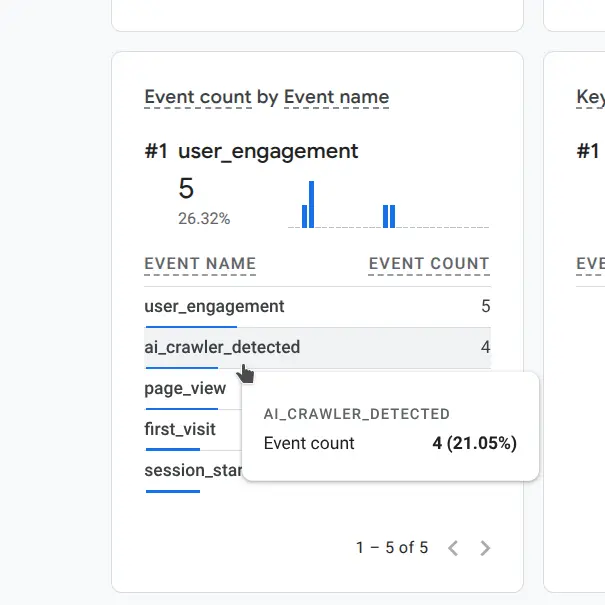
Within 1-2 minutes of your test requests, check Google Analytics 4:
- Go to Reports → Realtime
- Look for the
ai_crawler_detectedevent in the event stream - Click on the event to see the parameters (crawler_type, accessed_url, etc.)
Alternatively, you can use the DebugView:
- Go to Configure → DebugView (if enabled)
- Look for your events with full parameter details
Understanding the Data
Once events start flowing into GA4, you'll have access to rich data about AI crawler behavior:
Event Parameters
Each ai_crawler_detected event includes:
- crawler_type: The identified crawler name (GPTBot, ClaudeBot, etc.)
- user_agent: Full User-Agent string for detailed analysis
- accessed_url: The specific URL path that was crawled
- page_host: Your domain name
- page_location: Complete URL including protocol and domain
- ip_address: Source IP of the crawler
- http_referer: Referrer header (usually empty for crawlers)
Creating Custom Reports
In GA4, you can create custom explorations to analyze:
- Crawler Activity Over Time: Line chart showing events by crawler_type
- Most Crawled Pages: Table of accessed_url values sorted by event count
- Crawler Comparison: Compare which AI companies are most active
- Time-of-Day Patterns: When are crawlers most active?
- IP Distribution: Are crawlers coming from expected IP ranges?
I'll put some example reports here when I have enough data to create them.
Why This Approach Works
Advantages
1. Works with cached content: Unlike JavaScript-based analytics, this tracks at the NGINX level before any caching decisions are made.
2. No JavaScript required: AI crawlers typically don't execute JavaScript, making traditional analytics blind to their activity.
3. Zero performance impact: The tracking happens asynchronously after the response is sent. Crawlers (and your users) experience no slowdown.
4. Integrates with existing analytics: Data flows into GA4 where you can analyze it alongside regular traffic, create custom reports, and set up alerts.
5. Comprehensive crawler detection: The pattern list includes all major AI crawlers and is easy to update as new ones emerge.
6. Works behind reverse proxies: As long as the User-Agent header is preserved, this works with CDNs, load balancers, and other proxies.
Limitations
1. Relies on honest User-Agent strings: If a crawler lies about its identity or uses a generic User-Agent, it won't be detected.
2. Requires manual pattern updates: When new AI crawlers emerge, you need to add their patterns to the configuration.
3. IPv6 considerations: The current configuration forces IPv4 for GA4 requests. If your server is IPv6-only, you'll need to adjust the resolver settings.
4. Measurement Protocol limitations: GA4's Measurement Protocol has rate limits (roughly 2,000 events per second per property). For most sites this is more than sufficient.
Competitive Context
Several approaches exist for gaining visibility into AI crawlers without relying on Cloudflare. Parsing server access logs nightly (via tools like GoAccess, ELK stack, or custom scripts) provides comprehensive data but requires scheduled processing and doesn't integrate directly with GA4 for real-time reporting. Cloudflare Workers or Pages Functions can proxy requests and fire Measurement Protocol events, but this adds dependency on Cloudflare's ecosystem (and potential costs at scale). Alternatives like Apache modules (mod_security rules + Lua) or reverse-proxy layers (e.g., Traefik plugins) achieve similar results but often demand more configuration overhead or different server stacks. The NGINX + OpenResty Lua method here stands out for self-hosted environments: it's lightweight, non-blocking, runs entirely in your control, leverages NGINX's native strengths, and pipes data straight into your existing GA4 property with minimal ongoing maintenance.
Troubleshooting
"unknown directive" errors
If you see errors about unknown directives when testing the configuration, the Lua module isn't loaded properly. Verify:
# Check if module symlink exists
ls -la /etc/nginx/modules-enabled/ | grep lua

# Verify nginx configuration
sudo nginx -V 2>&1 | grep lua
"module 'resty.http' not found"
The required Lua libraries aren't installed:
sudo luarocks install lua-resty-http
sudo luarocks install lua-resty-string
sudo luarocks install lua-cjson
sudo systemctl reload nginx
"no resolver defined"
NGINX needs DNS resolution to reach Google Analytics:
http {
    resolver 8.8.8.8 8.8.4.4 valid=300s ipv6=off;
    resolver_timeout 5s;
}
"network is unreachable" for IPv6
Force IPv4-only resolution:
resolver 8.8.8.8 8.8.4.4 valid=300s ipv6=off;
Events not appearing in GA4
Check:
- Measurement ID and API Secret are correct
- NGINX error logs for failed requests:
sudo tail -f /var/log/nginx/error.log - Test with curl using a known crawler User-Agent
- Wait 1-2 minutes - there's a slight delay in GA4 Realtime
- Verify the GA4 property is active and receiving other events
Security Considerations
Protecting API Credentials
Your GA4 API secret is stored in plain text in the NGINX configuration. While this is generally acceptable since:
- NGINX config files require root access to read
- The API secret only allows sending data to GA4, not reading it
- Rate limiting prevents abuse even if compromised
You should still:
- Restrict access to NGINX config files:
chmod 640 /etc/nginx/nginx.conf - Consider using environment variables for extra security
- Rotate API secrets periodically
- Monitor GA4 for unexpected event volumes
Rate Limiting Crawler Traffic
If you discover certain crawlers are hitting your site too aggressively, you can add rate limiting:
# Define rate limit zone for AI crawlers
limit_req_zone $http_user_agent zone=ai_crawlers:10m rate=10r/s;

server {
    # Apply rate limit only to AI crawlers
    if ($http_user_agent ~* "GPTBot|ClaudeBot|Google-Extended") {
        set $limit_key $http_user_agent;
    }

    location / {
        limit_req zone=ai_crawlers burst=20 nodelay;
        # ... rest of config
    }
}
Future Enhancements
This implementation provides solid foundational tracking, but there are several directions we could take it:
1. Joomla Plugin
The natural next step is packaging this as a Joomla plugin that implements the same tracking functionality in PHP. This would be targeted at users on shared hosting environments where they don't have access to NGINX configuration or the ability to install Lua modules.
The plugin would:
- Detect AI crawlers in PHP: Check the User-Agent header in Joomla's system plugin event
- Send events to GA4 via Measurement Protocol: Make the same API calls we're doing in Lua, but from PHP
- Admin interface for GA4 credentials: Store and update Measurement ID and API Secret through Joomla admin
- Crawler pattern management: Add/remove/update crawler patterns through the admin interface
- Work on any hosting: No special server requirements - just standard PHP and cURL
The PHP implementation would be functionally identical to the NGINX/Lua version, just executing in the Joomla application layer instead of the web server layer. The advantage of the NGINX approach is performance (no PHP execution required), but the plugin approach works anywhere Joomla runs.
Friends of the site will understand why there is a Joomla extension in the works, but may not understand why we went with Nginx first. This site runs behind 2 layers of caching. If it ran a Joomla plugin to monitor AI crawlers, each page could only capture one bot every 15 minutes as cache expired, and if a user visited the page before a bot - the bot wouldn't get captured at all. If you've got a caching proxy at the edge - don't wait for the Joomla plugin, it won't help you. Use this method.
2. Enhanced Analytics
Additional tracking parameters could include:
- Response time: How long did it take to serve the content to the crawler?
- Response size: How much bandwidth is each crawler consuming?
- Response status codes: Are crawlers hitting 404s or 500s?
- Content type: What types of files are being crawled (HTML, images, PDFs)?
- Session reconstruction: Track crawler "sessions" across multiple page views
3. Intelligent Blocking
Based on crawler behavior patterns:
- Automatic rate limiting: Throttle aggressive crawlers
- Content-specific blocking: Allow crawlers on blog posts but block on private pages
- Time-based rules: Limit crawler access during peak traffic hours
- Bandwidth protection: Block crawlers if they exceed bandwidth thresholds
4. Multi-Property Support
For agencies managing multiple sites:
- Centralized dashboard: View crawler activity across all client sites
- Comparative analytics: Which sites are being crawled most heavily?
- Shared crawler patterns: Update patterns once, deploy everywhere
- Aggregated reporting: Total AI crawler impact across portfolio
5. Machine Learning Integration
Analyze patterns to:
- Predict crawler behavior: When will the next crawl cycle occur?
- Detect anomalies: Unusual crawler patterns that might indicate scraping
- Content recommendations: What content attracts the most AI crawler attention?
- ROI analysis: Correlate crawler activity with search engine performance
Conclusion
AI crawlers are an increasingly important part of the web ecosystem. As large language models become more prevalent, understanding how these systems interact with your content becomes crucial. Whether you're concerned about bandwidth usage, intellectual property, or simply want visibility into this new form of "traffic," tracking AI crawlers provides valuable insights.
This NGINX-based solution gives you that visibility without requiring Cloudflare or any third-party service. The data flows into Google Analytics 4 where you can analyze it using familiar tools and create custom reports tailored to your needs.
Best of all, the implementation is straightforward, the performance impact is zero, and the ongoing maintenance is minimal. Once configured, it runs silently in the background, recording every AI crawler visit and giving you the data you need to make informed decisions about how to handle this emerging class of web traffic.
Resources
- Google Analytics 4 Measurement Protocol
- OpenResty Lua NGINX Module Documentation
- Cloudflare AI Crawler Announcement
- AI Crawler User-Agent List
About This Implementation
This solution was developed for Joomla sites running on self-hosted infrastructure with NGINX. While the examples use Joomla-specific paths and configuration, the core approach works with any PHP application, static site, or even non-web applications served by NGINX.
The implementation prioritizes:
- Simplicity: Minimal dependencies, straightforward configuration
- Performance: Zero impact on request handling
- Reliability: Fails gracefully, doesn't break sites if GA4 is unavailable
- Maintainability: Clear code, modular design, easy to update
We hope this helps other site owners gain visibility into AI crawler activity. If you implement this solution, we'd love to hear about your results and any enhancements you make!
